更深入的响应式编程
第 8 章第一次把 Mono、Flux 和 WebFlux 放进项目时,响应式代码看起来很顺:查到任务,做一次转换,返回给客户端。到了真实业务里,链路却不会这么规整。TaskHub 中的一次任务状态变更,可能同时产生任务事件、SSE 推送和外部通知;通知服务可能超时,老模板引擎还会阻塞,某个浏览器也可能几十秒不读取事件。每个单点都能运行,组合起来后,问题才真正出现。
这一章不再另起一组互不相干的操作符示例。我们继续完成独立的 reactive-taskhub 模块:任务变更写入事件表,后台管道读取待处理事件,调用外部通知服务,并把进度推给在线客户端。主项目仍然使用 JPA、H2 或 PostgreSQL 和 Spring MVC;它们的调用契约是阻塞式的,不能因为返回值外面套了一个 Mono 就直接搬到 WebFlux 事件循环里。响应式模块要么使用 R2DBC 这样的非阻塞驱动,要么在明确的边界上隔离遗留阻塞调用。
我们会沿着一次故障往下查。最初的现象是:PATCH /api/tasks/{id} 很快返回成功,事件表里也有记录,但通知有时九秒后才到,有时收到两份;高峰期 SSE 连接开始断开;日志里的 traceId 在线程切换后消失。修复这些问题,需要把背压、线程、重试、上下文、测试和观测放在同一条管道里理解。
先把生产管道画清楚
先别急着加 retryWhen。我们要先知道一条任务事件经过了哪些边界,以及每个边界是否能响应下游需求。
TaskHub 的 MVC 主模块负责 /api/tasks 和任务持久化。Task 仍然有 id、title、description、status、priority、dueDate、createdAt 与 version,状态使用 TODO、IN_PROGRESS、DONE。这一章新增的 TaskEvent 和 NotificationReceipt 属于 reactive-taskhub 教学扩展,不把它们伪装成前面已经存在的 MVC 实体。

一次状态变更可以拆成下面几步:
- 主模块更新任务,同时可靠地写入一条待处理事件。
reactive-taskhub读取事件,按有界并发交给通知管道。- 管道依据事件类型选择通知渠道,为每次投递生成稳定的幂等键。
WebClient发起非阻塞请求,并为单次尝试设置超时。- 短暂故障进入有限重试;永久故障直接记为失败。
- 投递结果写入回执,同时通过 SSE 告诉在线客户端。
这里最容易被忽略的是第一步。若代码先提交任务事务,再把事件塞进内存中的 Sinks.Many,应用恰好在两者之间崩溃,任务已经变了,通知事件却永久丢失。反过来,若先发事件再提交任务,也可能通知了一个最终回滚的状态。生产系统通常把业务变更与待发送事件放进同一个数据库事务,后台再读取事件;本章把它称为事件表,工程里也常叫 outbox。
事件记录可以保持很小:
package com.welearn.taskhub.reactive.event;

import java.time.Instant;
import java.util.UUID;

public record TaskEvent(
        UUID eventId,
        Long taskId,
        TaskEventType type,
        long taskVersion,
        Instant occurredAt
) {}
taskVersion 来自任务的乐观锁版本。它既能帮助客户端判断事件顺序,也能让我们发现“版本 8 已经处理,版本 7 才到达”这种异常。它不是幂等键:同一版本仍可能发往邮件、企业消息等多个渠道。真正的投递键应至少包括 eventId 和渠道。
我们把事件读取与通知调用分成接口,后面测试时可以替换真实网络:
public interface TaskEventSource {
    Flux<TaskEvent> pendingEvents();
}

public interface NotificationGateway {
    Mono<DeliveryReceipt> send(TaskEvent event, NotificationChannel channel);
}

public interface DeliveryReceiptRepository {
    Mono<Boolean> alreadyDelivered(UUID eventId, NotificationChannel channel);
    Mono<Void> save(DeliveryReceipt receipt);
    Mono<Void> saveFailure(TaskEvent event,
                           NotificationChannel channel,
                           Throwable error);
}
这几个接口还帮我们区分了“描述一条管道”和“启动一条管道”。调用 pendingEvents() 只会得到一个 Flux 对象,调用 send(...) 也只会得到一个 Mono 对象。此时操作符已经组装,业务动作通常还没有发生。直到 WebFlux、StepVerifier 或后台 worker 发起订阅,上游才收到 onSubscribe,随后按照需求产生 onNext,最后以 onComplete 或 onError 结束。取消则通过 cancel 反向传给上游。
这个延迟执行特性解释了几个看似古怪的现象。第一,把 log.info("开始发送") 写在返回 Mono 之前,记录的是“组装方法被调用”,不一定是“网络请求开始”;要观察执行,应放进 defer、doOnSubscribe 或真正的调用回调。第二,同一个冷 Mono 被订阅两次,源动作也可能执行两次。第三,重试并不是把失败的对象从中间扶起来继续跑,而是重新订阅它的上游。后面讨论重复通知时,这一点会成为关键。
独立应用对外保留第 8 章的 SSE 契约:
@GetMapping(value = "/api/task-events",
        produces = MediaType.TEXT_EVENT_STREAM_VALUE)
public Flux<ServerSentEvent<TaskEventView>> events() {
    return eventStream.liveEvents()
            .map(TaskEventView::from)
            .map(view -> ServerSentEvent.builder(view)
                    .id(view.eventId().toString())
                    .event("task-event")
                    .build());
}
访问 http://localhost:8081/api/task-events 后,连接不会像普通 JSON 请求那样立即结束,而会随着任务动态持续收到事件:
id:8b2f4c
event:task-event
data:{"taskId":41,"status":"IN_PROGRESS","version":5}

id:91a77e
event:task-event
data:{"taskId":41,"status":"DONE","version":6}
空行代表一个 SSE 事件结束,不代表整个响应完成。浏览器离开页面时会取消订阅;应用关闭或源故障时也可能结束连接。客户端如果要求断线续传,需要带回最后收到的事件 ID,再由服务端从可靠事件存储补发缺口。本地内存流只能服务在线订阅者,不能代替历史记录。
接口返回响应式类型,不代表实现一定非阻塞。要看实现里面使用的驱动:R2DBC、Reactor Netty 可以组成非阻塞链路;JPA、JDBC 和大多数老 SDK 仍会占住调用线程。这个区别会在后面的线程故障里直接暴露出来。
响应式的价值不在于把每个方法签名都改成 Mono。真正有用的是:从事件源、操作符、网络客户端到数据驱动都遵守同一套异步信号与取消协议,并且队列有清楚的上限。链路中只要出现一个无限队列或未隔离的阻塞调用,高并发下的行为就会偏离预期。
背压不是一个自动限速开关
故障现场最先看到的是内存增长。有人在事件流末尾加了 limitRate(64),以为它会把处理速度限制为“每秒 64 个”,然后发现通知服务仍然被瞬时流量打满。
limitRate 里的 64 不是时间单位。它做的是需求重塑:如果下游一次请求 Long.MAX_VALUE,limitRate 会把这个大需求拆成较小批次再传给上游。它能限制一段链路同时在途的元素数量,却不会主动等待一秒,也不会替外部系统计算 QPS。
从 request(n) 看需求账本
Reactive Streams 中,订阅者在 onSubscribe 后通过 request(n) 告诉上游“我还能接收 n 个元素”。需求是累加的:先 request(2) 再 request(3),在没有消费前就有 5 个配额。上游发出一个 onNext,配额减一;配额为零时,遵守规范的上游不能继续发 onNext。onComplete 和 onError 不需要等配额,它们是终止信号。

下面的测试故意从零需求开始。它比在日志里盯着一百万个数字更能说明背压:
@Test
void subscriberControlsHowManyEventsCanArrive() {
    Flux<String> events = Flux.just("任务已创建", "开始处理", "处理完成");

    StepVerifierOptions options = StepVerifierOptions.create()
            .initialRequest(0)
            .scenarioName("任务事件遵守下游需求");

    StepVerifier.create(events, options)
            .expectSubscription()
            .expectNoEvent(Duration.ofMillis(20))
            .thenRequest(2)
            .expectNext("任务已创建", "开始处理")
            .expectNoEvent(Duration.ofMillis(20))
            .thenRequest(1)
            .expectNext("处理完成")
            .expectComplete()
            .verify(Duration.ofSeconds(1));
}
前 20 毫秒没有元素,不是生产者慢,而是需求为零。请求两个元素后只收到两个;第三个要等下一次请求。这是背压最朴素的含义。
普通的 subscribe(value -> ...) 会请求一个近似无限的需求,通常表现为 Long.MAX_VALUE。这对小型有限列表没有问题,却会让“我明明使用了 Reactor,为什么上游一下拿了这么多”显得意外。框架并不知道业务一次能处理多少;使用只接收值的便捷订阅方式,就等于订阅者声明自己愿意持续接收。需要精确控制时,可以在测试中使用初始请求量,也可以实现受控 Subscriber,但业务代码更常通过 limitRate、有界并发和数据源分页来表达容量。
也不要为了显示自己理解背压而永远 request(1)。每收一个元素再请求一个,会形成停等式往返,在跨线程或跨网络边界上浪费调度与确认成本。较小批次可以限制内存,较大批次可以摊薄请求开销,合适的水位取决于元素大小、处理时间和允许的在途数量。背压控制的是数量,不知道每个元素是一百字节还是十兆字节;如果事件载荷差异很大,还要在入口限制单条大小,不能只看元素个数。
需求信号也不会在错误后复活一条订阅。onError 与 onComplete 都是终止信号,终止后原 Subscription 结束;重试之所以能继续,是因为它建立了新订阅。这个机制同时解释了资源为何必须按订阅获取和释放,也解释了重试为什么会再次执行冷源副作用。
实际操作符会重新计算需求。buffer(10) 的下游请求一个缓冲,向上游表达的可能是十个元素;flatMap 有并发数和预取量;publishOn 为跨线程传递建立队列,也会预取。调优时只看最末端的 request(n) 不够,还要看中间操作符怎样放大或分批需求。
Flux<TaskEvent> shaped = eventSource.pendingEvents()
        .doOnRequest(n -> log.debug("事件源收到需求: {}", n))
        .limitRate(64, 48);
这里首次向上游请求最多 64 个,消费到补充阈值后再请求一批。高低水位让管道保持忙碌,避免每处理一个元素就进行一次“停下—确认—再请求”的往返。具体日志可能类似:
事件源收到需求: 64
事件源收到需求: 48
事件源收到需求: 48
这仍不是业务限流。如果外部通知商规定每秒最多 20 次,应使用真正带时间维度的限流器,或把通知交给有配额控制的队列消费者。limitRate 解决的是响应式链路里的在途需求,不是远端 API 套餐的速率限制。
背压只有传得回去才有用
Flux.range、R2DBC 结果流和遵守 Reactive Streams 的消息适配器通常能按需求发数据。鼠标事件、UDP 数据、第三方 webhook 这类源头却未必能被我们放慢。对方已经把请求发到网卡,应用里的 request(1) 不会穿过互联网命令对方停止生产。
这时只能在边界处做明确选择:
- 不能丢的任务状态事件,先进入数据库事件表或可靠消息系统,再按消费能力读取。
- 允许合并的进度事件,可以只保留最新值,但要在产品语义里承认中间值会消失。
- 允许丢弃的瞬时指标,可以使用丢弃策略,同时记录丢弃数量。
- 什么都不能丢、源头又不能减速、存储也没有上限,这三个条件无法同时成立。系统最终只会把内存当作没有声明的队列。
因此,TaskHub 不把本地 Sink 当可靠事件仓库。先保存事件,再用 Sink 发一个“有新事件”的唤醒提示。唤醒失败也不会丢业务事实,轮询仍能在下一轮读到数据库记录:
@Component
public class EventWakeupSignal {

    private final Sinks.Many<UUID> sink = Sinks.many()
            .multicast()
            .onBackpressureBuffer(256, false);

    public Mono<Void> wakeUp(UUID eventId) {
        return Mono.fromRunnable(() -> {
            Sinks.EmitResult result = sink.tryEmitNext(eventId);
            if (result.isFailure()) {
                log.warn("唤醒信号未发出, eventId={}, result={}", eventId, result);
            }
        });
    }

    public Flux<UUID> signals() {
        return sink.asFlux();
    }
}
不要忽略 tryEmitNext 的返回值。并发发射、没有订阅者、队列溢出或 Sink 已终止都可能让发射失败。若这里只调用 tryEmitNext(eventId); 然后丢掉结果,日志会表现为“业务接口成功,但事件偶尔凭空消失”。
给并发和预取写出上限
通知是远程 I/O,适合并发,但并发不能由事件量决定。下面的 flatMap 最多同时处理 8 个事件,每个内层序列预取 1 个:
public Flux<DeliveryOutcome> dispatchPending() {
    return eventSource.pendingEvents()
            .limitRate(64, 48)
            .flatMap(
                    this::deliverOneEventSafely,
                    8,
                    1
            );
}
若同一任务的版本必须严格按顺序投递,不能只靠 flatMap。它保证并发上限,不保证完成顺序。小规模流可以按任务分组后在组内使用 concatMap,但无限任务 ID 会产生越来越多的分组。生产环境更稳妥的办法是按 taskId 做固定数量的分区,让相同任务进入同一分区串行处理;分区数是有界的,任务数可以继续增长。
设想版本 5 的事件需要调用一个两秒的慢接口,版本 6 只需五十毫秒。flatMap 会让两个调用同时开始,于是版本 6 很可能先完成。若外部系统把通知当成最终状态,用户会先看到“已完成”,两秒后又看到“处理中”。这不是数据库乱序,而是我们选择了允许交错完成的组合方式。
几种常见组合方式可以用同一问题来判断:
flatMap允许内层并发并按完成时间交错,适合互不依赖的通知。concatMap每次只订阅一个内层,前一个完成后才处理后一个,适合必须保持源顺序的状态变更。flatMapSequential允许前面的工作并发开始,但按源顺序向下游交付。它能缩短等待,却要暂存“已经完成但前序未完成”的结果,因此仍要关注并发数和缓冲。
不要用“哪个操作符性能最好”来选。要问的是:业务允许完成顺序变化吗,远端能承受多少在途请求,为了恢复顺序最多愿意缓存多少结果。对于一封邮件和一个站内提醒,两者可并发;对于同一任务连续的状态投影,顺序通常是契约的一部分。
flatMap 的并发上限也不是线程数。非阻塞 HTTP 调用等待响应时不占住一条专属线程,八个在途调用可能由少量事件循环线程协作推进。把并发从 8 调到 800,不会凭空得到更多 CPU 或远端容量,只会让连接池、内存和对方服务承受更大的瞬时压力。并发值应从远端配额、连接池上限、超时和期望延迟反推,再用压测与指标校正。
背压还要逐段检查。事件源到 flatMap 之间支持 request(n),不代表 flatMap 内部调用的远端服务也理解 Reactive Streams 需求。我们能做的是只启动有限数量的 HTTP 请求;请求一旦写出,对方按自己的节奏处理。把“上游需求”和“外部副作用并发”分开描述,调优时才不会拿错旋钮。
onBackpressureBuffer(10000) 不是修复,只是把故障推迟到第 10001 个元素。每个缓冲都要回答三个问题:最大容量是多少,满了以后做什么,丢失或失败是否符合业务语义。答不出来时,先不要加缓冲。
找出藏在事件循环里的阻塞调用
把事件流的在途数量压住后,九秒延迟仍然存在。线程转储显示多个 reactor-http-nio-* 线程停在老模板引擎里。代码看起来已经“响应式化”:
public Mono<String> renderMessage(Long taskId) {
    return Mono.just(legacyTemplateRenderer.render(taskId));
}
问题就在 Mono.just 的参数。Java 会先执行 legacyTemplateRenderer.render(taskId),拿到字符串后才调用 Mono.just。如果渲染过程读文件、查 JDBC 或等待远程 SDK,阻塞发生在组装这段代码的当前线程上,Mono 根本来不及接管。
更隐蔽的错误是把 publishOn 放在阻塞源后面:
return Mono.fromCallable(() -> legacyTemplateRenderer.render(taskId))
        .map(this::normalize)
        .publishOn(Schedulers.boundedElastic());
publishOn 只影响它之后的操作。fromCallable 和 normalize 仍可能在订阅线程,也就是 Netty 事件循环上运行。线程切换晚了一步。
在源头建立阻塞桥
正确的桥接方式是延迟调用,并让订阅动作在专门的有界弹性调度器上发生:
public Mono<String> renderMessage(Long taskId) {
    return Mono.fromCallable(() -> legacyTemplateRenderer.render(taskId))
            .subscribeOn(Schedulers.boundedElastic())
            .timeout(Duration.ofSeconds(2));
}
fromCallable 把调用推迟到订阅时;紧跟其后的 subscribeOn 把源的订阅与执行移出事件循环。boundedElastic 会限制线程和等待任务数量,适合不得不等待的阻塞工作。它不是无限线程池,也不会让阻塞代码突然变成非阻塞代码。队列满时,延迟和拒绝仍会发生,所以还需要超时、指标和容量规划。
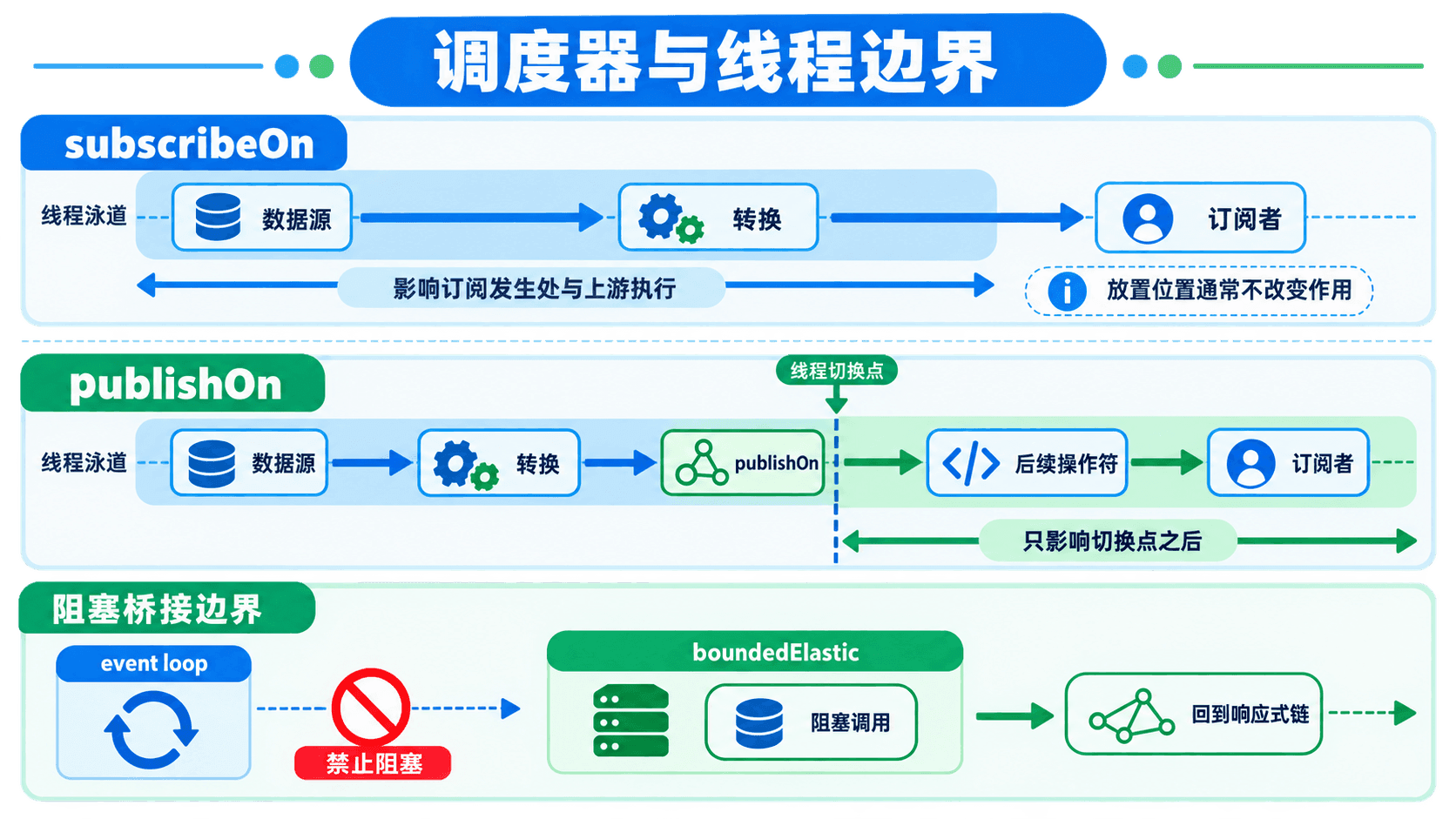
桥接层应尽量窄。不要在控制器入口加一次 subscribeOn(boundedElastic()),然后把整个 WebFlux 应用都挪过去。那样虽然短期内看不到事件循环被卡住,却失去了少量线程复用非阻塞 I/O 的好处,还会把所有问题塞进同一队列。把桥放在每个已知阻塞源旁边,代码审查时一眼就能看出迁移债务在哪里。
这也是主项目的 JPA 仓库没有直接注入 reactive-taskhub 的原因。下面这种写法仍会阻塞:
// 错误:map 不会改变 taskRepository.findById 的阻塞性质
Mono<Task> task = Mono.just(taskId)
        .map(id -> taskRepository.findById(id).orElseThrow());
短期必须复用 JPA 时,可以按上面的 fromCallable + subscribeOn 建桥,并给独立容量;长期需要端到端响应式数据访问时,应让响应式模块使用 R2DBC。不要在同一业务事务里假设 JPA 事务与 R2DBC 事务能自动合并,它们使用不同的连接与事务管理方式。
publishOn 与 subscribeOn 到底改了哪里
下面这段代码打印关键步骤的线程名:
public Mono<String> threadDemo(Long taskId) {
    return Mono.fromCallable(() -> {
                log.info("读取模板: {}", Thread.currentThread().getName());
                return legacyTemplateRenderer.render(taskId);
            })
            .subscribeOn(Schedulers.boundedElastic())
            .map(message -> {
                log.info("整理文本: {}", Thread.currentThread().getName());
                return normalize(message);
            })
            .publishOn(Schedulers.parallel())
            .map(message -> {
                log.info("计算签名: {}", Thread.currentThread().getName());
                return sign(message);
            });
}
一次运行可能得到:
读取模板: boundedElastic-1
整理文本: boundedElastic-1
计算签名: parallel-1
subscribeOn 影响源被订阅的执行位置,所以在它之后、第一次 publishOn 之前的同步操作通常也跟着源线程运行。多个 subscribeOn 不是逐段切换工具,靠近订阅源并实际接管订阅的那一个起主要作用,其余往往只增加调度开销。
publishOn 在链中建立一个异步边界,把后续信号交给指定调度器,直到遇到下一个 publishOn。它很适合“后面这段 CPU 工作放到并行调度器”或“后面必须保持线程亲和性”的场景,但每次切换都意味着任务入队、出队、缓存移动和新的预取边界。
如果只是把标题转成大写,下面这种写法纯属制造开销:
return events
        .publishOn(Schedulers.parallel())
        .map(TaskEventView::title)
        .publishOn(Schedulers.parallel())
        .map(String::toUpperCase)
        .publishOn(Schedulers.parallel())
        .map(this::addPrefix);
同一个调度器连续切三次,并不会得到三倍并行度。一般先让便宜的同步转换留在当前线程,只在阻塞边界或确实值得并行的 CPU 阶段切换一次。若某段 CPU 计算很重,还要限制并发;Schedulers.parallel() 的线程数接近 CPU 核心数,塞入长时间任务同样会让其他链路饥饿。
parallel() 也不是给普通 Flux 加速的通用按钮。它会把序列分成多条 rail,还需要 runOn(scheduler) 指定执行位置,最后通常用 sequential() 合回普通 Flux。拆分、排队、合并都有成本,元素很少或每个转换只花几微秒时,管理并行的开销可能比计算本身更大。
只有独立、CPU 密集且计算量足够的工作才值得考虑这种形式:
Flux<SignedPayload> signed = payloads
        .parallel()
        .runOn(Schedulers.parallel())
        .map(this::calculateExpensiveSignature)
        .sequential();
如果 calculateExpensiveSignature 内部等待 JDBC 或同步 HTTP,换成 parallel() 只是同时阻塞更多并行线程。阻塞工作仍应进入有界弹性边界;原生异步 HTTP 则直接使用 flatMap 的并发参数,不需要为每个请求安排一条等待线程。
还有一个判断线程切换是否过量的简单办法:在几个真正的边界打印线程名,而不是在每个 map 都打印。若同一条事件在完成一次便宜转换前反复出现 parallel-*、boundedElastic-*、reactor-http-nio-*,先画出每次切换是为了解决什么问题。说不出理由的切换可以先移除,再由基准与正确性测试证明是否需要加回来。
调度器不是数据隔离机制。多个订阅可以共享同一个 Schedulers.parallel(),也可能在不同时间落到同一 worker。不要把可变业务状态存在调度器线程的 ThreadLocal 里,也不要因为 publishOn 之后信号按序到达就误以为整个服务只有一个线程。顺序保证属于特定订阅的信号协议,共享对象仍要遵守并发安全规则。
把超时、重试和幂等性设计成一件事
线程阻塞修完后,通知平均延迟降了下来,但测试人员报告:同一个“任务已完成”通知偶尔出现两次。日志显示第一次调用在两秒后超时,第二次重试成功。远端服务后来确认,第一次请求其实已经落库,只是响应在网络上丢了。
这就是重试最危险的误解:超时只说明我们没按时收到结果,不说明对方没执行。retryWhen 会重新订阅上游,也就是重新做一次副作用。查询通常可以重试,扣款、发信、创建工单等操作若没有幂等保护,重试会把一次不确定结果放大成多次业务动作。

先把错误分成可重试与不可重试
TaskHub 的通知网关把错误分为两类:
- 连接失败、读超时、服务端
5xx和明确要求稍后再试的429,通常是短暂故障。 - 参数错误、鉴权失败、收件人不存在等
4xx,重复同一个请求通常不会自行恢复。
若把所有 RuntimeException 都重试三次,一个拼错的地址会被打四次,鉴权失败还会加重远端压力。我们为远端响应建立明确的异常类型:
public final class TemporaryNotificationException extends RuntimeException {
    public TemporaryNotificationException(String message) {
        super(message);
    }
}

public final class PermanentNotificationException extends RuntimeException {
    public PermanentNotificationException(String message) {
        super(message);
    }
}
单次 HTTP 调用只负责把状态码翻译成业务结果:
private Mono<DeliveryReceipt> sendOnce(
        TaskEvent event,
        NotificationChannel channel,
        String idempotencyKey
) {
    return webClient.post()
            .uri("/notifications")
            .header("Idempotency-Key", idempotencyKey)
            .bodyValue(NotificationRequest.from(event, channel))
            .exchangeToMono(response -> {
                if (response.statusCode().is2xxSuccessful()) {
                    return response.bodyToMono(RemoteReceipt.class)
                            .map(body -> DeliveryReceipt.sent(
                                    event.eventId(), channel, idempotencyKey,
                                    body.remoteId()));
                }

                int status = response.statusCode().value();
                if (status == 429 || response.statusCode().is5xxServerError()) {
                    return response.releaseBody().then(Mono.error(
                            new TemporaryNotificationException(
                                    "通知服务暂时不可用, status=" + status)));
                }

                return response.releaseBody().then(Mono.error(
                        new PermanentNotificationException(
                                "通知请求被拒绝, status=" + status)));
            });
}
使用 exchangeToMono 时,错误分支要消费或释放响应体,否则连接可能不能及时回到连接池。成功分支读取远端回执,失败分支只保留我们真正需要的状态信息,不把敏感响应全文写进日志。
每次尝试都有超时,整条任务也有预算
我们用 Mono.defer 保证每次重试都会创建一次新的 HTTP 调用,并把单次超时放在可重试源内:
private Mono<DeliveryReceipt> sendWithRetry(
        TaskEvent event,
        NotificationChannel channel
) {
    String key = event.eventId() + ":" + channel.code();

    Retry retryPolicy = Retry.backoff(3, Duration.ofMillis(200))
            .maxBackoff(Duration.ofSeconds(2))
            .jitter(0.5)
            .filter(this::isTransientFailure)
            .doBeforeRetry(signal -> log.warn(
                    "通知准备重试, eventId={}, channel={}, retry={}, reason={}",
                    event.eventId(),
                    channel.code(),
                    signal.totalRetries() + 1,
                    signal.failure().getClass().getSimpleName()))
            .onRetryExhaustedThrow((spec, signal) ->
                    new NotificationDeliveryException(
                            "通知重试耗尽: " + event.eventId(),
                            signal.failure()));

    return Mono.defer(() -> sendOnce(event, channel, key)
                    .timeout(Duration.ofSeconds(2)))
            .retryWhen(retryPolicy)
            .timeout(Duration.ofSeconds(8));
}

private boolean isTransientFailure(Throwable error) {
    return error instanceof TemporaryNotificationException
            || error instanceof WebClientRequestException
            || error instanceof TimeoutException;
}
Retry.backoff(3, ...) 表示最多重试三次,加上首次调用,最多可能发生四次尝试。退避从约 200 毫秒开始,逐步增加,并加入抖动,避免许多实例在远端恢复的一瞬间同时重试。最外层八秒超时是整条投递的总预算,防止单次超时与退避组合后把事件长期占在在途集合里。
应用层 timeout 是最后一道明确上限,但网络客户端本身也应有连接超时、响应读取超时与连接池等待上限。它们解决的阶段不同:连接超时约束建立 TCP 连接,读取超时约束已连接后的网络沉默,池等待超时约束“没有可用连接”的排队;Reactor 的 timeout 则观察整段 Publisher 在约定时间内是否产生信号。只配其中一个,仍可能在另一个阶段长期等待。
这些时间不能随意都设为两秒。整体预算应大于单次尝试预算与必要退避之和,又不能超过业务还能接受的延迟。假设通知允许八秒,单次调用两秒,最多三次重试,再加指数退避,理论最坏值可能已经超过八秒;最外层预算会提前取消后续尝试。这是有意的取舍,日志应区分“单次调用超时”“连接池等待超时”和“整体预算耗尽”,否则指标里全叫 timeout,仍无法知道该扩连接池、降低并发,还是调整远端服务。
取消本地订阅也不等于撤回已经发送的 HTTP 字节。若超时发生在远端完成之后、响应到达之前,对方仍会产生结果。因此超时、取消与重试都不能替代幂等性。反过来,幂等也不意味着可以无限重试;每次尝试仍占连接、线程调度、日志和对端处理资源。
操作符顺序决定语义。如果先 onErrorResume 把错误变成默认值,再接 retryWhen,重试永远看不到错误。如果把单次 timeout 放到 retryWhen 外面,它限制的可能是包含所有重试在内的整体时间。两种写法都可能合理,但必须先说清楚要限制“一次尝试”还是“整项工作”。
一次故障恢复的日志可能是:
通知准备重试, eventId=8b2..., channel=EMAIL, retry=1, reason=TimeoutException
通知准备重试, eventId=8b2..., channel=EMAIL, retry=2, reason=TemporaryNotificationException
通知投递成功, eventId=8b2..., channel=EMAIL, remoteId=mail-9017, attempts=3
幂等要覆盖远端与本地两侧
稳定的 Idempotency-Key 必须在所有重试中保持不变。若每次尝试都重新生成 UUID,远端看到的仍是多个不同请求。远端服务也必须真正按这个键去重;只发请求头而对方不识别,不能产生幂等性。
本地回执表再加一道约束:(event_id, channel) 唯一。处理前先查已成功回执,写回执时依靠唯一约束防住并发竞争:
private Mono<DeliveryOutcome> deliverToChannel(
        TaskEvent event,
        NotificationChannel channel
) {
    return receiptRepository
            .alreadyDelivered(event.eventId(), channel)
            .flatMap(delivered -> {
                if (delivered) {
                    return Mono.just(DeliveryOutcome.skipped(
                            event.eventId(), channel, "已经投递"));
                }

                return sendWithRetry(event, channel)
                        .flatMap(receiptRepository::save)
                        .thenReturn(DeliveryOutcome.sent(
                                event.eventId(), channel));
            });
}
“先查再发”本身不是原子操作:两个实例可能同时查到未发送,然后都调用远端。因此仍要靠分区消费、事件认领租约、本地唯一约束和远端幂等键共同兜住。任何一个单点都不足以覆盖进程崩溃、网络超时和并发抢占的全部窗口。
投递失败不能让后台总流直接终止。错误在单个事件范围内记录后转成结果,下一条事件还要继续处理:
private Mono<DeliveryOutcome> deliverOneEventSafely(TaskEvent event) {
    return notificationPolicy.channelsFor(event)
            .concatMap(channel -> deliverToChannel(event, channel))
            .collectList()
            .map(outcomes -> DeliveryOutcome.combined(event.eventId(), outcomes))
            .onErrorResume(error -> receiptRepository
                    .saveFailure(event, NotificationChannel.UNKNOWN, error)
                    .thenReturn(DeliveryOutcome.failed(event.eventId(), error)));
}
onErrorResume 放在事件内层。如果把它放在最外层 Flux 后面,第一条坏事件可能先终止整个事件订阅,再切到一个备用流;后续待处理事件不会自动回到原来的读取位置。
不要对包含副作用的链路无条件调用 retry()。先回答四件事:什么错误值得重试,最多尝试几次,全部尝试允许占用多久,同一次业务动作如何保持幂等。任何一项没有答案,都可能把一次故障变成重复通知或重试风暴。
缓存会改变订阅语义
故障修复过程中还有一个看似省事的建议:“事件流查一次挺贵,在最后加个 cache(),后面的订阅者就都复用吧。”对只有一个值的配置查询,这有时成立;对不会结束的任务事件流,无参数 cache() 会记住从订阅开始以来的全部 onNext,供后来订阅者重放。事件持续一天、一个月,内存就持续增长一天、一个月。
缓存不只是性能优化,它会把冷源的订阅行为改成共享和重放。原本每个订阅者独立执行的源,可能变成第一次订阅触发一次,之后的订阅者拿同一份结果;错误和完成信号也可能被缓存。若缓存的是带权限裁剪的任务视图,第一个用户的结果被后一个用户复用,还会变成数据隔离问题。
区分快照、在线事件和可靠历史
TaskHub 中有三种看起来都叫“数据”的东西,缓存方式完全不同:
TaskSnapshot是某一时刻的任务快照,读取成本高且允许几秒陈旧时,可以按任务 ID 使用短 TTL 缓存。任务更新后主动失效,或者接受 TTL 内的旧值。- 在线 SSE 事件只服务当前连接。新订阅者是否需要最近几条,要由产品契约决定;需要时使用按数量或时间有界的重放。
- 不能丢的通知历史属于数据库事件表和回执表。它需要查询、分页、保留策略与审计,不应靠进程内 Reactor 缓存保存。
一个短期快照可以这样表达:
Mono<TaskSnapshot> snapshot = Mono.defer(() -> snapshotClient.fetch(taskId))
.cache(Duration.ofSeconds(5));第一次订阅触发读取,五秒内后续订阅复用信号,过期后的下一次订阅重新读取。这里仍要留意两点。第一,cache 可能缓存错误,如果远端短暂失败,错误也可能在 TTL 内被重复看到;需要根据使用的重载和业务要求决定错误是否应立即失效。第二,若 snapshot 对象是在一个单例服务初始化时按某个 taskId 创建,它只对应那个 ID,不能拿来装所有任务。
在线事件需要有限重放时,可以用有界的 replay Sink:
private final Sinks.Many<TaskEventView> liveEvents = Sinks.many()
        .replay()
        .limit(50);
后来连接的客户端最多收到最近 50 条,再接收新事件。50 是内存语义,不是可靠历史边界;应用重启后这些记录会消失。若必须从任意断点恢复,客户端带 Last-Event-ID,服务端从持久化事件表查询该 ID 之后的事件,然后再衔接在线流。补历史和接实时之间还要用版本或事件序号去重,避免交界处漏一条或重复一条。
如果客户端只需要订阅之后的新值,可以使用不重放的共享流。share() 会让多个订阅者共享上游,最后一个订阅者离开时通常取消上游,之后的新订阅可能建立一次新连接。它与 cache() 的“记住历史”完全不同。选之前要先写下迟到订阅者应该看到什么,而不是看哪个名字更像性能优化。
无界还会藏在集合操作符里
不只有 cache() 会留住元素。对无限流调用 collectList(),它永远等不到完成,列表也会持续增长;groupBy(taskId) 会在任务 ID 不断出现时维护越来越多的组;按时间开的窗口若下游没有及时消费,窗口本身也会堆积。响应式 API 可以描述无限序列,这不代表任何聚合都能在无限序列上得到有限结果。
检查一条长期运行的 Flux 时,可以逐个寻找“保留历史”的操作符:缓冲、窗口、排序、去重、分组、重放、收集。然后为每处写出释放条件:达到数量、超过时间、下游消费、任务终止或显式取消。一个操作符文档里写着“支持背压”,也不能替代这份内存账本,因为有些状态正是为了实现顺序、重放或去重而保留。
永不结束的 Flux 上不要直接使用无边界 cache()、collectList() 或全量 sort()。先把业务窗口切成有限范围,或者把历史交给能分页、淘汰和持久化的存储。进程内堆内存不应成为默认事件仓库。
Context 解决的是订阅上下文,不是线程归属
通知延迟和重复修好后,排障仍有一个麻烦:入口日志有 traceId,经过 publishOn 后,外部通知日志里的 MDC 却变成空。传统 Servlet 应用常把请求 ID 放进 ThreadLocal,因为一个请求大部分时间由同一线程处理。WebFlux 的线程不是请求专属资源;一个线程可以交替处理许多订阅,同一订阅也可能跨线程继续。

一次演示输出就能看出差别:
入口   thread=reactor-http-nio-2 ThreadLocal=trace-7 Context=trace-7
签名   thread=parallel-1         ThreadLocal=null    Context=trace-7
回执 thread=reactor-http-nio-4 ThreadLocal=null Context=trace-7线程换了,ThreadLocal 留在原线程上;Reactor Context 绑定的是订阅,所以仍能读取同一个 traceId。它是不可变的键值容器,put 会返回新 Context,不会修改一个全局 Map。
在 WebFilter 写入,在需要处延迟读取
入口过滤器可以接收客户端传来的追踪 ID,也可以生成一个,并把它写到订阅上下文:
@Component
public class TraceContextWebFilter implements WebFilter {

    public static final String TRACE_ID = "traceId";

    @Override
    public Mono<Void> filter(
            ServerWebExchange exchange,
            WebFilterChain chain
    ) {
        String incoming = exchange.getRequest()
                .getHeaders()
                .getFirst("X-Trace-Id");
        String traceId = incoming == null || incoming.isBlank()
                ? UUID.randomUUID().toString()
                : incoming;

        exchange.getResponse().getHeaders().set("X-Trace-Id", traceId);

        return chain.filter(exchange)
                .contextWrite(context -> context.put(TRACE_ID, traceId));
    }
}
使用处通过 deferContextual 在订阅时读取:
private Mono<DeliveryReceipt> tracedSend(
        TaskEvent event,
        NotificationChannel channel
) {
    return Mono.deferContextual(contextView -> {
        String traceId = contextView.getOrDefault("traceId", "background");
        log.info("开始通知, traceId={}, eventId={}, channel={}",
                traceId, event.eventId(), channel.code());
        return sendWithRetry(event, channel);
    });
}
为什么不在方法开头直接读取?因为响应式链在组装时通常还没有订阅,Context 也尚未沿订阅关系建立。deferContextual 把读取动作延迟到每次订阅,两个请求复用同一个管道定义时,仍能得到各自的上下文。
Context 的可见方向容易写反。contextWrite 从订阅端向上游提供值,所以需要读取值的操作符应位于它的上方。看下面两段:
Mono<String> visible = Mono.deferContextual(ctx ->
        Mono.just(ctx.getOrDefault("traceId", "missing")))
        .contextWrite(ctx -> ctx.put("traceId", "trace-7"));

Mono<String> invisible = Mono.just("start")
        .contextWrite(ctx -> ctx.put("traceId", "trace-7"))
        .flatMap(ignored -> Mono.deferContextual(ctx ->
                Mono.just(ctx.getOrDefault("traceId", "missing"))));
第一段得到 trace-7,第二段得到 missing。第二段的读取在 contextWrite 下游,那个写入对它不可见。遇到 Context 丢失时,先检查操作符位置,不要立刻再塞一个全局变量。
Context 里该放什么
适合放入 Context 的是与业务数据正交、体积很小、跟一次订阅相关的信息,例如 traceId、安全主体摘要、区域或观测对象。任务标题、通知正文、几百 KB 的附件不该放进去;它们就是业务参数,应在类型和方法签名中明确传递。
也不要把可变的 HashMap 放进 Context 后让多个并发分支共同修改。Context 自身不可变,不代表里面的对象自动线程安全。若每条事件都有不同字段,直接让 TaskEvent 携带它们,比把 Context 当隐形参数袋更容易测试。
后台事件没有 HTTP 入口,可以从事件 ID 建立追踪上下文:
private Mono<DeliveryOutcome> withEventContext(TaskEvent event) {
    String traceId = "event-" + event.eventId();
    return deliverOneEventSafely(event)
            .contextWrite(context -> context
                    .put("traceId", traceId)
                    .put("taskId", event.taskId()));
}
如果日志框架仍依赖 MDC,需要在记录日志的信号附近把 Context 值临时复制进 MDC,并在 finally 或可关闭句柄中清除。不要在入口设置一次 MDC 后期待它穿过所有线程。Spring 与 Micrometer 的上下文传播能力可以减少样板代码,但概念没有变化:Reactor Context 是订阅范围,MDC/ThreadLocal 是线程范围,桥接必须发生在边界。
让后台订阅有明确的生命周期
控制器返回 Mono 或 Flux 时,WebFlux 会负责订阅与取消。后台通知 worker 没有 HTTP 客户端替我们订阅,需要应用自己管理。最常见的坏味道是在 @PostConstruct 里调用 .subscribe(),不保存返回的 Disposable,关闭应用时也不取消。部署章节配置了优雅关闭,但这个孤儿订阅不会因为愿望而自动收尾。
可以用 Spring 生命周期组件持有订阅:
@Component
public class NotificationWorker implements SmartLifecycle {

    private final NotificationPipeline pipeline;
    private final AtomicBoolean running = new AtomicBoolean();
    private volatile Disposable subscription;

    public NotificationWorker(NotificationPipeline pipeline) {
        this.pipeline = pipeline;
    }

    @Override
    public void start() {
        if (!running.compareAndSet(false, true)) {
            return;
        }

        subscription = pipeline.dispatchPending()
                .subscribe(
                        outcome -> log.debug("投递完成: {}", outcome),
                        error -> {
                            running.set(false);
                            log.error("事件源终止,worker 需要恢复", error);
                        },
                        () -> running.set(false)
                );
    }

    @Override
    public void stop() {
        Disposable current = subscription;
        if (current != null) {
            current.dispose();
        }
        running.set(false);
    }

    @Override
    public boolean isRunning() {
        return running.get();
    }
}
单个事件的失败已经在内层转成 DeliveryOutcome.failed,所以不该到达最外层错误回调。最外层错误意味着事件源连接断开、反序列化契约损坏等管道级故障。此处不能只记一条日志后永远停摆,可以让部署平台重启实例,或为事件源建立单独、有限且可观测的恢复策略。不要让同一条坏业务事件触发整个源的无限重订阅。
subscribe 的三个回调不是完整的恢复方案。错误回调被调用时,这次订阅已经终止,在回调里把 running 改成 false 不会自动新建订阅。若决定进程内恢复,应把策略放在事件源边界,并限制次数、退避时间和总预算;恢复耗尽后让健康状态转为不可用,由编排平台接管。若事件源正常完成本来就意味着“当前批次结束”,worker 可以由定时触发下一批,而不是把完成当错误。
启动也要避免双订阅。应用上下文刷新、手工调用和生命周期回调若都能进入 start(),两个 worker 可能同时读取同一批事件。代码中的 compareAndSet 只保护单进程;多实例部署还需要数据库认领状态、租约或消息系统的消费者组。没有跨实例认领时,扩大 Pod 数量只会增加重复投递概率,不会安全地增加吞吐。
认领事件时可以记录 claimedBy 与 leaseUntil。实例处理成功后确认,失败则记录原因并按策略安排下一次;实例崩溃后,租约过期的事件可被其他实例重新认领。租约时间要覆盖正常处理,又不能长到崩溃后久久不恢复。无论租约多精细,处理与确认之间仍存在崩溃窗口,所以投递端的幂等键依旧不可省。
取消是协作式的。dispose() 会向上游发送取消信号,但已经发出的远端请求不一定在纳秒级停止,对端也可能已经完成副作用。关闭流程应停止认领新事件,等待当前在途事件到达宽限时间,再取消剩余工作。未确认的事件保留在事件表,下一实例根据租约重新认领;幂等键负责处理“旧实例其实已经发出,新实例又接手”的窗口。
SSE 连接也要处理取消。浏览器关闭页面时,下游会取消订阅,管道应停止为这个连接构造视图,并记录结束类型:
public Flux<ServerSentEvent<TaskEventView>> streamTaskEvents(Long taskId) {
    return liveEvents.forTask(taskId)
            .map(TaskEventView::from)
            .map(view -> ServerSentEvent.builder(view)
                    .event("task-event")
                    .id(view.eventId().toString())
                    .build())
            .doFinally(signal -> log.debug(
                    "任务事件流结束, taskId={}, signal={}", taskId, signal));
}
doFinally 会看到 ON_COMPLETE、ON_ERROR、CANCEL 等结束类型,比只写 doOnComplete 更适合释放订阅级资源。数据库连接、文件句柄这类资源更适合 usingWhen,分别定义正常完成、错误和取消时的异步清理,不要依赖对象终结器。
用 StepVerifier 证明时间、需求与上下文
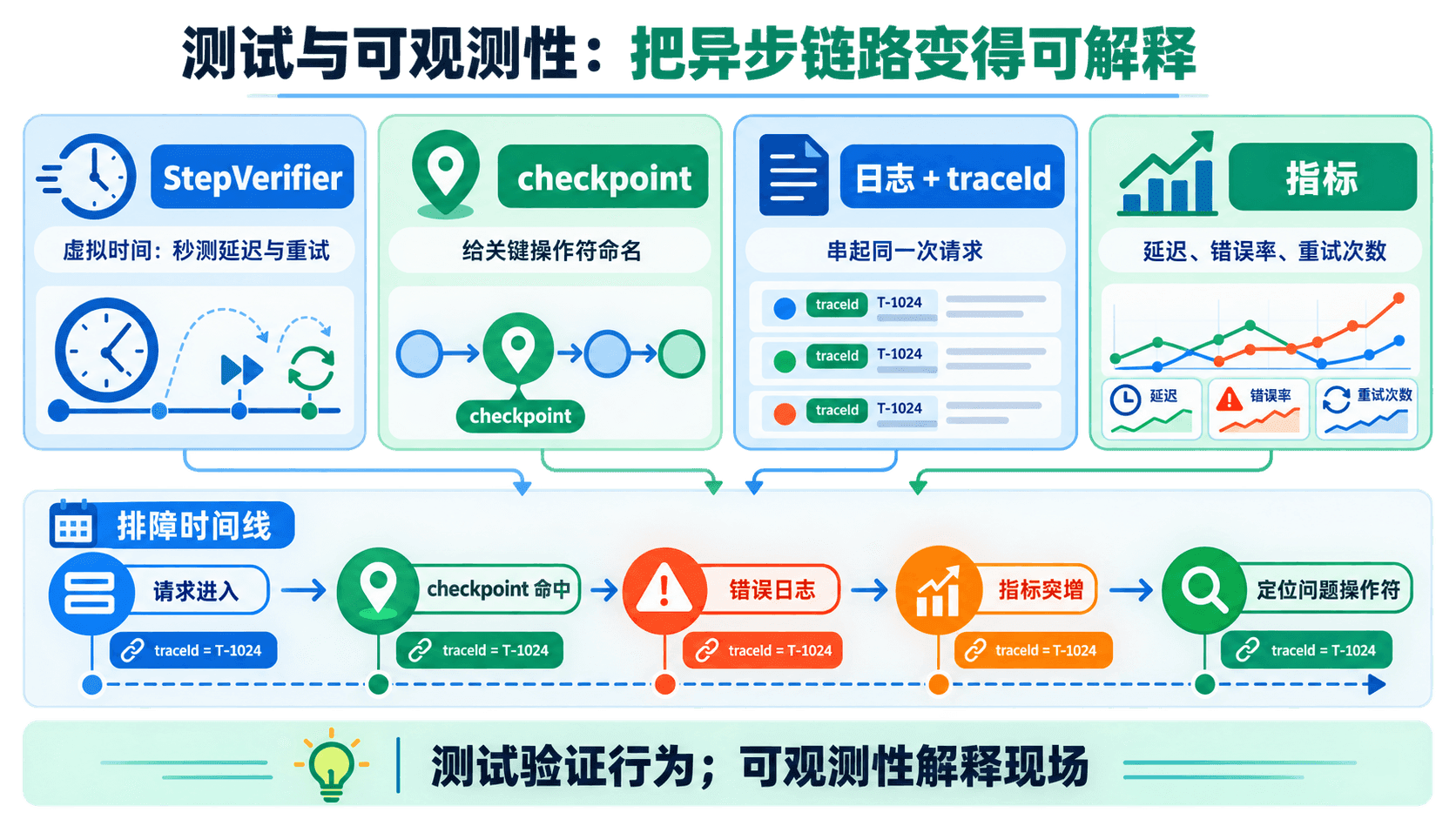
响应式代码最难测的不是 map 是否把字符串转成大写,而是“还没请求时不应发数据”“两次退避后才成功”“切线程后 Context 仍在”“失败不会终止后续事件”。这些行为用 block() 拉成同步值后会被抹平,应该直接断言信号序列。
测需求时从零开始
前面的背压测试使用 initialRequest(0),这是一个很有价值的习惯。StepVerifier.create(publisher) 默认会请求一个很大的数量,很多不遵守需求的实现也可能看起来正常。手动 thenRequest 才能证明管道在零需求时不会偷跑。
测试还应设置验证超时。verify() 默认可以无限等待,一旦期望数量写错,CI 会一直挂着而不是快速告诉你哪里不对。可以逐个测试调用 verify(Duration),也可以为测试套件设置统一默认值并在结束后恢复。
用虚拟时间测试退避
真实等待 200 毫秒、400 毫秒、800 毫秒会让测试越来越慢。withVirtualTime 会替换常用调度器的时间源,让我们推进虚拟时钟:
@Test
void retriesTwiceAndThenSucceeds() {
    AtomicInteger attempts = new AtomicInteger();

    StepVerifier.withVirtualTime(() ->
                    Mono.defer(() -> {
                                int current = attempts.incrementAndGet();
                                if (current < 3) {
                                    return Mono.<String>error(
                                            new TemporaryNotificationException(
                                                    "远端暂时不可用"));
                                }
                                return Mono.just("SENT");
                            })
                            .retryWhen(Retry.backoff(
                                            3, Duration.ofSeconds(1))
                                    .jitter(0)))
            .expectSubscription()
            .expectNoEvent(Duration.ofSeconds(1))
            .thenAwait(Duration.ofSeconds(2))
            .expectNext("SENT")
            .expectComplete()
            .verify(Duration.ofSeconds(1));

    assertThat(attempts).hasValue(3);
}第一次失败后等待一秒,第二次失败后等待两秒,第三次成功。jitter(0) 只用于让测试确定;生产配置仍应保留抖动。
有个常见陷阱:待测 Mono 必须在 withVirtualTime 的 Supplier 内组装。下面的写法可能仍抓住真实调度器:
// 错误:delayed 在虚拟时间启用前已经组装
Mono<String> delayed = service.deliveryWithBackoff();
StepVerifier.withVirtualTime(() -> delayed);
正确做法是 StepVerifier.withVirtualTime(service::deliveryWithBackoff),或者在 lambda 中完整创建序列。另一个陷阱是把 expectNoEvent 放在第一步;订阅本身也算事件,所以应先写 expectSubscription()。对于永不结束的流,最后用 thenCancel() 或 expectTimeout,不要等一个不会到来的 onComplete。
退避次数通过,不代表异常分类正确。还要用两个紧挨着的测试固定策略:瞬时异常可以重试,业务异常一次就结束。
@Test
void retriesOnlyTemporaryFailure() {
    AtomicInteger attempts = new AtomicInteger();

    Mono<String> result = Mono.defer(() -> {
                int current = attempts.incrementAndGet();
                return current == 1
                        ? Mono.error(new TemporaryNotificationException("连接重置"))
                        : Mono.just("SENT");
            })
            .retryWhen(Retry.max(3)
                    .filter(TemporaryNotificationException.class::isInstance));

    StepVerifier.create(result)
            .expectNext("SENT")
            .expectComplete()
            .verify(Duration.ofSeconds(1));

    assertThat(attempts).hasValue(2);
}

@Test
void doesNotRetryPermanentFailure() {
    AtomicInteger attempts = new AtomicInteger();

    Mono<String> result = Mono.defer(() -> {
                attempts.incrementAndGet();
                return Mono.<String>error(
                        new PermanentNotificationException("收件地址无效"));
            })
            .retryWhen(Retry.max(3)
                    .filter(TemporaryNotificationException.class::isInstance));

    StepVerifier.create(result)
            .expectError(PermanentNotificationException.class)
            .verify(Duration.ofSeconds(1));

    assertThat(attempts).hasValue(1);
}
第二个断言的重点不只是异常类型,还包括 attempts == 1。如果某次重构把过滤条件删掉,最终仍可能抛出同一种业务异常,但中间已经多打了三次远端请求;只检查最终错误就捕捉不到这个回归。
测试耗尽重试时也要看异常链。默认策略可能抛出“重试耗尽”包装异常,真正的最后一次网络错误在 cause 中。生产代码用了 onRetryExhaustedThrow 后,测试应固定外层业务异常与内部 cause,确保统一错误处理既能给运维稳定分类,又没有丢掉排障根因。
直接断言 Context
Context 不需要靠打印线程名间接测试。StepVerifier 可以提供初始上下文并检查可访问内容:
@Test
void traceIdSurvivesSchedulerSwitch() {
    Mono<String> traced = Mono.deferContextual(context ->
                    Mono.just(context.get("traceId")))
            .publishOn(Schedulers.parallel());

    StepVerifierOptions options = StepVerifierOptions.create()
            .withInitialContext(Context.of("traceId", "trace-test-42"))
            .scenarioName("追踪上下文跨线程传播");

    StepVerifier.create(traced, options)
            .expectAccessibleContext()
            .contains("traceId", "trace-test-42")
            .then()
            .expectNext("trace-test-42")
            .expectComplete()
            .verify(Duration.ofSeconds(1));
}
这个测试验证的是订阅上下文,不依赖具体线程名。线程池编号会随运行环境变化,把 parallel-1 写进断言只会得到脆弱测试。
验证失败被限制在单个事件
我们还要证明一条永久失败不会吞掉后续事件:
@Test
void oneBadEventDoesNotStopThePipeline() {
    TaskEvent first = event("first");
    TaskEvent second = event("second");

    when(gateway.send(eq(first), any()))
            .thenReturn(Mono.error(
                    new PermanentNotificationException("地址无效")));
    when(gateway.send(eq(second), any()))
            .thenReturn(Mono.just(receipt(second)));

    StepVerifier.create(pipeline.dispatch(Flux.just(first, second)))
            .assertNext(outcome ->
                    assertThat(outcome.status()).isEqualTo(FAILED))
            .assertNext(outcome ->
                    assertThat(outcome.status()).isEqualTo(SENT))
            .expectComplete()
            .verify(Duration.ofSeconds(1));
}
若这个测试只收到第一条错误并终止,说明 onErrorResume 放错了层级。排障时,信号结构往往比某个操作符的名字更重要:错误属于单个元素、单个分区,还是整条订阅?处理操作符应该放在那个边界内。
把取消也当作正常路径测试
SSE 和后台 worker 都可能被取消。取消不是错误,也不会调用 onComplete。如果资源只在成功或错误分支释放,客户端正常关页反而会留下资源。下面的测试用 doFinally 观察取消,并确认上游收到了信号:
@Test
void cancellationReleasesSubscriptionResource() {
    AtomicBoolean cancelled = new AtomicBoolean();
    AtomicReference<SignalType> finalSignal = new AtomicReference<>();

    StepVerifier.withVirtualTime(() ->
                    Flux.interval(Duration.ofSeconds(1))
                            .doOnCancel(() -> cancelled.set(true))
                            .doFinally(finalSignal::set))
            .expectSubscription()
            .thenAwait(Duration.ofSeconds(2))
            .expectNext(0L, 1L)
            .thenCancel()
            .verify(Duration.ofSeconds(1));

    assertThat(cancelled).isTrue();
    assertThat(finalSignal).hasValue(SignalType.CANCEL);
}
若待清理的是异步资源,测试对象应使用 Flux.usingWhen。它可以分别提供完成、错误和取消的清理函数。测试时让三种路径各走一次,并验证连接归还或租约释放方法被调用。不要只测最舒服的完成路径;长期事件流最常见的结束方式往往就是取消。
thenCancel() 还避免了另一个测试陷阱:Flux.interval 不会自行完成,如果最后写 expectComplete(),验证会一直等。给 verify 设置超时只能让它较快失败,不能修正错误的业务预期。测试脚本应和真实订阅生命周期一致。
在 reactive-taskhub 根目录执行完整测试:
./mvnw test项目中的顺序事件测试、瞬时故障重试测试、业务异常不重试测试和应用上下文测试会一起运行。结果如下:
[INFO] Running com.welearn.taskhub.reactive.ResilientTaskLookupTest
[INFO] Tests run: 2, Failures: 0, Errors: 0, Skipped: 0
[INFO] Running com.welearn.taskhub.reactive.TaskHubReactiveApplicationTests
[INFO] Tests run: 1, Failures: 0, Errors: 0, Skipped: 0
[INFO] Running com.welearn.taskhub.reactive.TaskEventServiceTest
[INFO] Tests run: 1, Failures: 0, Errors: 0, Skipped: 0
[INFO] Tests run: 4, Failures: 0, Errors: 0, Skipped: 0
[INFO] BUILD SUCCESS这里的“通过”有具体含义:四条事件按序发出;短暂上游错误会在限制次数内恢复;IllegalArgumentException 这类业务错误不会被当成瞬时故障重试;Spring Boot 4.1.0 的响应式应用上下文能够启动。它不代表真实通知商、连接池与数据库已经被端到端覆盖,那些边界仍需要模拟服务器、集成测试和部署后的指标来验证。
虚拟时间适合 Reactor 调度的 delay、timeout 和退避,不会让真实数据库或真实 HTTP 服务跟着快进。网络契约应使用模拟服务器或替身网关测试;不要把真实 I/O 塞进虚拟时间测试后等待奇迹。
从“通知很慢”走到可定位的证据
测试能阻止已知问题回归,生产现场还需要回答四个问题:事件积压在哪里,当前在途多少,失败属于哪一类,一次事件跨线程后走过哪些步骤。只记录最终异常堆栈,通常回答不了这些问题。
先判断“慢”发生在哪个阶段
“通知很慢”至少可能代表五件不同的事:事件迟迟没有被读取;事件已读取但在等待并发配额;HTTP 请求在等连接;请求已经发出但远端响应慢;远端成功后本地回执保存慢。它们在用户眼里都是晚到几秒,处理办法却完全不同。
一次有效排查可以按事件 ID 固定一条时间线。先找业务变更提交时间,再找事件被认领时间、单次调用开始时间、连接建立或取得时间、响应时间和回执确认时间。任意相邻两点的差就是一个阶段的等待。若日志没有这些点,先补观测再调参数;盲目把超时从两秒改到十秒,只会让等待更久才暴露。
接着把时间线与资源指标对照:
- 提交到认领间隔增长,同时最老事件年龄上升,说明消费赶不上生产或事件源停止。
- 认领到调用开始间隔增长,同时在途数达到上限,说明并发配额不足或每项工作占用过久。
- 调用开始后很久才取得连接,同时连接池等待数升高,说明池容量和管道并发不匹配。
- 连接取得很快、首个响应字节很慢,问题偏向网络或远端服务。
- HTTP 成功后回执迟迟未保存,检查 R2DBC 连接池、数据库锁与回执唯一约束冲突。
线程名只能作为辅助证据。看到 boundedElastic-* 不代表安全,池内仍可能排队;看到 reactor-http-nio-* 也不代表一定阻塞,正常网络回调本来就在事件循环上。要结合线程状态、阶段耗时和队列指标,而不是把某个线程前缀直接判成根因。
信号级日志也很有帮助。短小复现流可以记录 onSubscribe、request、onNext、cancel 和终止信号。如果订阅后从未出现请求,问题在下游没有表达需求;有请求却没有元素,检查源是否真的产生数据;已经 cancel 后仍看到外部副作用完成,则回到“取消不能撤回已发送请求”的边界,而不是怀疑 Reactor 忽略取消。
错误处理也会篡改证据。这样的代码会让所有问题看起来都像“没有通知”:
return sendWithRetry(event, channel)
        .onErrorResume(error -> Mono.empty());
Mono.empty() 是成功完成但没有值,最外层可能把它当正常跳过。若业务允许降级,也要先记录有限错误类别、保存失败回执,再返回一个明确的 DeliveryOutcome.failed。不要使用没有边界的“继续处理”把序列中的坏元素悄悄丢掉;一条数据失败后哪些状态仍可信,要由具体操作符与业务步骤共同决定。
日志记录业务坐标,不记录整份载荷
每条通知日志至少带 traceId、eventId、taskId、channel、attempt 与结果。它们能把入口、事件、远端调用和回执串起来。通知正文可能包含任务描述与用户信息,不应为了排障整段写入日志。
修复后的时间线可以是:
10:21:03.114 INFO  event-8b2 认领事件 eventId=8b2 taskId=41 version=6
10:21:03.118 INFO  event-8b2 开始通知 channel=EMAIL attempt=1
10:21:05.121 WARN  event-8b2 单次超时 channel=EMAIL elapsedMs=2003
10:21:05.347 INFO  event-8b2 开始通知 channel=EMAIL attempt=2
10:21:05.512 INFO  event-8b2 投递成功 remoteId=mail-9017 elapsedMs=2168
10:21:05.516 INFO  event-8b2 保存回执 status=SENT
这段日志说明等待发生在第一次远端调用,不在事件读取或回执保存。若只有“处理开始”和“处理结束”,中间两秒会成为黑箱。
指标使用有限标签
第 11 章已经让 Actuator 暴露应用观测入口。响应式管道应补上业务指标:
- 待处理事件数与最老事件年龄,判断是否积压。
- 当前在途通知数,判断并发上限是否长期打满。
- 投递耗时分布,区分正常波动与尾延迟。
- 按渠道、结果、错误类别统计次数。
- 重试与丢弃计数,发现远端退化或本地容量不足。
这些指标要组合看。待处理事件数上升,而在途数始终等于 8,说明消费者已打满并发上限;若远端耗时同时升高,问题更可能在下游。待处理数上升、在途数接近零、事件源错误计数增加,则应先检查数据库连接或事件认领。重试数突然增加但最终成功率尚可,是远端开始抖动的早期信号;等成功率归零才告警,通常已经错过处理窗口。
“队列长度为 1000”本身也缺少时间维度。一千个一秒内产生的事件,和一千个积压了两小时的事件,严重程度完全不同。最老待处理事件年龄能直接回答用户已经等了多久,通常比单纯计数更接近业务影响。告警可以要求积压数量和最老年龄同时越过阈值,避免短暂批量导入触发无意义告警。
并发上限、连接池和远端容量要形成可解释关系。如果管道允许 32 个 HTTP 调用并发,连接池却只有 8 条连接,其余 24 个会在池里等待;从业务计时看它们已经“开始”,实际请求还没发出。若连接池等待时间没有单独指标,团队可能误判为远端响应慢。通常让管道并发不超过可用连接与远端许可,再留出健康检查和其他调用的余量。
eventId、taskId、traceId 的取值近乎无限,不能作为指标标签,否则时间序列数量会持续膨胀。它们属于日志和链路追踪。指标标签使用 channel=EMAIL、result=SUCCESS、error=TIMEOUT 这种有限集合。
一个轻量的计时包装可以写成:
private Mono<DeliveryReceipt> observedSend(
        TaskEvent event,
        NotificationChannel channel
) {
    return Mono.defer(() -> {
        Timer.Sample sample = Timer.start(meterRegistry);
        inFlight.incrementAndGet();

        return tracedSend(event, channel)
                .doOnSuccess(receipt -> Counter.builder(
                                "taskhub.notification.completed")
                        .tag("channel", channel.code())
                        .tag("result", "success")
                        .register(meterRegistry)
                        .increment())
                .doOnError(error -> Counter.builder(
                                "taskhub.notification.completed")
                        .tag("channel", channel.code())
                        .tag("result", errorCategory(error))
                        .register(meterRegistry)
                        .increment())
                .doFinally(signal -> {
                    inFlight.decrementAndGet();
                    sample.stop(Timer.builder("taskhub.notification.duration")
                            .tag("channel", channel.code())
                            .register(meterRegistry));
                });
    });
}
计时放在 retryWhen 外还是内也有不同语义:放在外面得到一次业务投递包含重试的总耗时,放在单次 HTTP 调用内得到每次尝试耗时。实际可以同时保留两个不同名称的 Timer,不要用同一个指标混合两种口径。
代码中的 inFlight 可以注册为 Gauge,但更新它的每个路径都必须成对。doFinally 很适合做减一,因为成功、错误和取消都会经过;如果在 doOnSuccess 与 doOnError 各减一次,就容易漏掉取消。增量应在 defer 中发生,确保每次订阅各自加一,而不是应用启动组装单例管道时提前加一。
错误分类函数也应返回有限枚举,例如 timeout、connection、remote_5xx、permanent_4xx、unexpected。不要直接用异常消息做标签,同一类异常可能包含 URL、状态文本或任务 ID,结果还是高基数。详细 cause 留在带采样和脱敏的日志中。
checkpoint 留下组装位置
响应式异常的运行栈常被一层层操作符包装,看到的是信号传播位置,不一定是这条链在哪里组装。给关键业务边界加静态 checkpoint:
return eventSource.pendingEvents()
        .checkpoint("task-event-source")
        .flatMap(this::withEventContext, 8, 1)
        .checkpoint("notification-dispatch");
发生错误时,增强信息会出现类似内容:
Error has been observed at the following site(s):
    |_ checkpoint ⇢ notification-dispatch
带描述的轻量 checkpoint 不必为每个事件捕获完整组装栈,适合长期留在关键链路。描述应稳定且能定位代码,不要把每个 eventId 拼进描述制造大量字符串。需要深入复现时,可以在开发环境启用全局操作符调试;它会为大量操作符捕获组装信息,开销明显,不应把 Hooks.onOperatorDebug() 当生产默认配置。
log() 操作符会打印订阅、请求、元素、取消与终止信号,适合本地看一小段流。对高吞吐管道全量开启会产生大量日志,还可能把事件内容带出去。线上更合适的是固定 checkpoint、结构化业务日志、指标和采样追踪。
回到最初的故障
现在可以把开头的现象逐项解释:
- 九秒延迟来自遗留模板渲染在
reactor-http-nio上阻塞,少数事件占住了本来应该轮转处理网络 I/O 的线程。 limitRate(64)没有限制每秒请求数,它只重塑需求;远端调用并发还需要flatMap的并发上限和业务限流。- 重复通知来自超时后的重新订阅。第一次请求可能已经成功,稳定幂等键和回执唯一约束补上了不确定窗口。
traceId丢失是把线程范围的 MDC 当成请求范围。改用 Reactor Context 后,追踪信息随订阅跨线程传播。- SSE 断开后仍有工作,是订阅没有正确处理取消。生命周期和
doFinally让连接结束与后台 worker 都有明确归属。
修复不是“换一个更高级的操作符”,而是重新标出每个边界:哪里能接受 request(n),哪里只能缓冲或持久化;哪里是非阻塞 I/O,哪里必须桥接;哪些错误允许重试,副作用如何去重;信息属于线程还是订阅;订阅由谁开始、由谁停止。
把完整的 TaskHub 放在一起看
走到这里,TaskHub 已经不是一个只会返回 Hello World 的控制器。我们从 Spring Boot 的启动与自动配置开始,选定 Java、Maven 和开发工具;随后建立 /api/tasks,让任务可以创建、查询、修改和删除。任务模型逐步有了状态、优先级、截止日期、创建时间与乐观锁版本,数据从内存进入 H2,再为生产环境切换到 PostgreSQL。
围绕这个模型,我们补上了参数校验、统一错误响应、配置检查、分页与按 status、keyword 的查询;Controller、Service、Repository 的边界不再只是文件夹习惯,而是让 HTTP、业务规则和持久化可以分别测试和替换。Spring MVC 承担主 CRUD 链路,事务与 JPA 继续使用它们擅长的阻塞式执行模型。
项目随后拥有了单元测试、Web 层测试和集成测试,Basic 与 Form 登录保护了需要授权的操作。Actuator 提供健康与指标入口。构建阶段生成 Maven 可执行 JAR,Docker 镜像使用分层构建、非 root 用户、健康检查和外部配置,应用可以在关闭时停止接收新请求并等待在途工作。
第 8 章单独建立的 reactive-taskhub 让我们接触 WebFlux、Mono、Flux 与 SSE。本章没有把它强行覆盖到整个 MVC 主模块上,而是给它一条适合响应式模型的任务事件与外部通知管道:可靠事件表保存不能丢的事实,有界需求和并发控制在途元素,阻塞桥接隔离遗留代码,超时与有限重试处理短暂故障,幂等键与回执约束处理不确定结果,Context、StepVerifier、checkpoint、日志和指标则让跨线程行为能够被测试和定位。
最后得到的是两个边界清楚、可以协作的模块:主模块稳定处理任务 CRUD、关系数据与安全规则;响应式模块处理长连接、事件流和大量等待型 I/O。若业务规模还不需要事件通知,主模块可以独立运行;若通知量增长,响应式 worker 又可以单独扩容。技术选择终于落到了具体代价上,而不是“所有接口都要响应式”或“响应式一定更快”这种口号。
面对下一项需求时,可以从依赖开始选模型,而不是从 Controller 返回类型开始。任务创建需要 JPA 事务、同步校验和一次短响应,MVC 与平台线程的写法直接、调试栈完整,没有理由为了形式改成 WebFlux。任务事件端点需要保持大量长连接,绝大部分时间都在等待新事件,WebFlux 的事件循环更匹配。一次请求需要同时聚合多个原生非阻塞上游时,Mono.zip 或有界 flatMap 也能让等待重叠;若所有上游都是阻塞 SDK,套上响应式外壳只会制造桥接层和新的容量问题。
还要把团队成本算进去。响应式链的错误、取消、Context 与操作符位置都需要共同约定;测试必须会读信号,监控必须区分订阅、在途和重试。若吞吐需求普通,团队却无法稳定排查这些语义,清楚的命令式实现通常更可靠。反过来,长连接很多、上游原生异步、等待远多于计算,并且团队已经建立 StepVerifier 与观测规范时,响应式模型能减少等待线程和手工回调编排。
从运维角度,两条路径也不该共用一个模糊的容量数字。MVC 主模块关注请求线程、JPA 连接池、事务时间和数据库锁;响应式模块关注事件循环是否阻塞、在途订阅、WebClient 连接池、事件积压与取消。把它们拆开部署后,可以根据各自瓶颈扩容,也能避免一次通知洪峰抢走普通任务 CRUD 的数据库与线程资源。
这不意味着两个模块永远不能合并。若未来数据访问、认证、调用链都迁移到非阻塞实现,并且合并能减少运维复杂度,可以重新评估。但迁移应由可测量的负载与边界驱动:先列出每个阻塞依赖,替换或隔离它;再用压测比较吞吐、尾延迟、内存和调试成本。只改方法签名、保留内部阻塞,不算完成迁移。
课程最终留下的也不只是代码。REST 的状态码与 DTO 是客户端契约,数据库迁移和乐观锁是数据契约,安全过滤器链是访问契约,Docker 健康检查与优雅关闭是运行契约;本章的需求、取消、超时与幂等则是异步执行契约。遇到故障时,我们不需要靠“响应式很复杂”来解释,而能指出哪一份契约没有被遵守。
以后再看到一条很长的 Reactor 链,可以先沿着本章留下的顺序检查:数据源能否接受需求,缓冲有没有上限,阻塞调用是否越过边界,线程为何切换,重试是否安全,Context 在哪里写入,取消由谁处理,测试和指标能否证明这些判断。只要这些问题有明确答案,管道即使很长,也仍然是一组可以逐段验证的契约。