Cache Components:静态外壳、缓存与刷新
现在的拾光书架已经有首页、完整书单和动态详情页。它们都从服务器读取 JSON,但两份数据的生命周期并不相同:书籍是随项目发布的稳定内容,读后感会在网站运行期间继续写入持久存储。
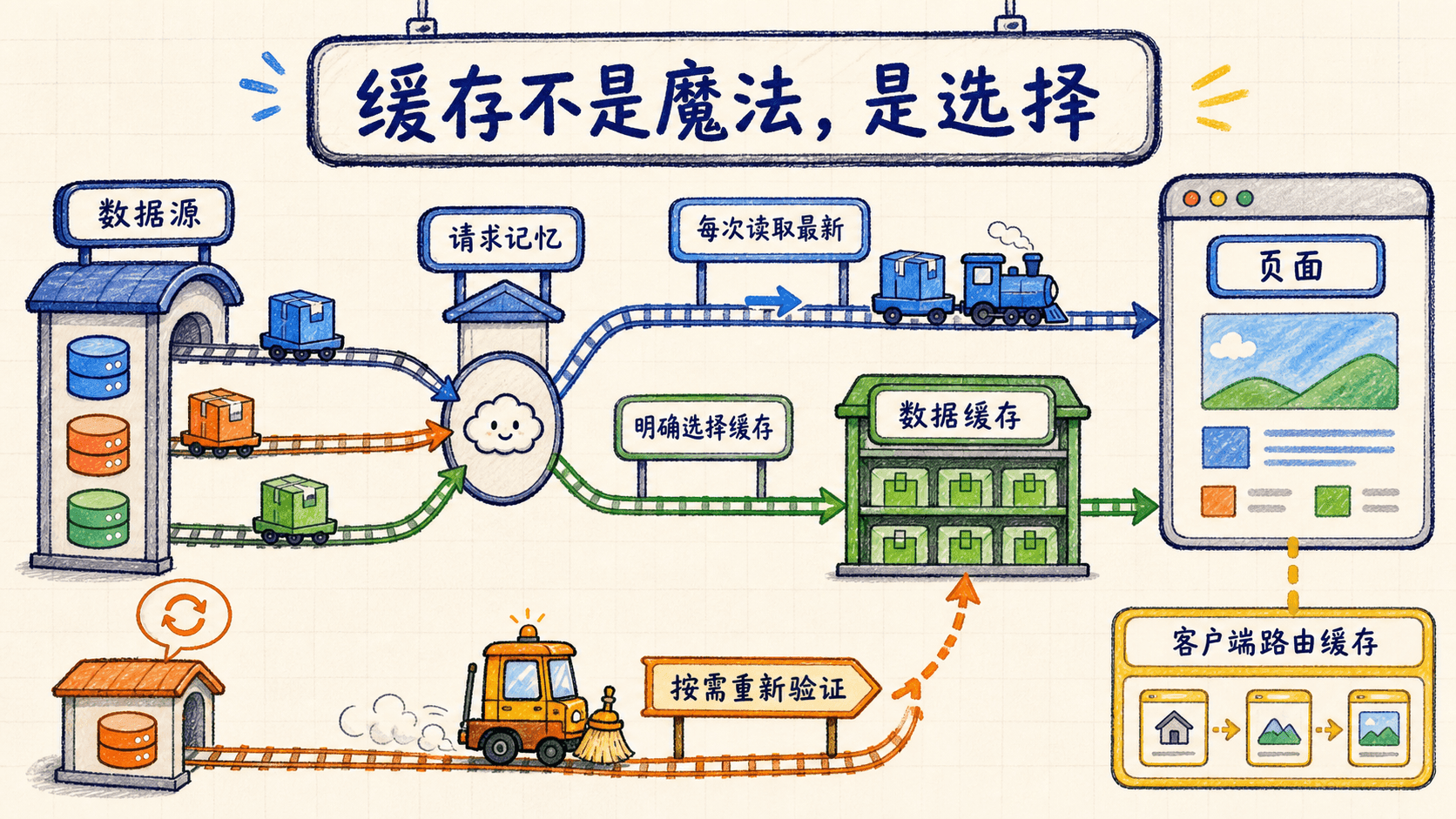
如果把它们一股脑儿放进同一种缓存,构建时读到的读后感就可能变成长期快照,后续写入无法及时出现在页面上。这一课会先按数据生命周期做选择:缓存稳定书籍,让可写读后感始终按请求读取,再用 Suspense 把两者组合成首页的部分预渲染结果。
先按数据生命周期做选择
缓存不是异步函数的默认奖励。决定是否缓存之前,先问两个问题:这份数据会不会在应用运行期间改变?改变以后,缓存系统能不能收到明确通知?
拾光书架当前有两类数据:
books.json 的内容只有重新发布项目或未来建立书籍管理入口时才改变,适合用时间策略复用。notes.json 会挂载到可写持久存储上,用户提交成功后文件就会变化。Next.js 的函数缓存不会自动监听文件系统,因此不能把构建时读到的 notes 数组当成持续可信的结果。
运行期可写持久文件不能直接做构建快照缓存。否则新版本构建时读到的种子数据可能进入缓存,真实持久卷上的后续内容却无法及时替换它。
缓存与预渲染是两个层次
数据缓存回答“相同读取要不要再执行”,预渲染回答“请求到来前能把页面准备到什么程度”。Cache Components 会在构建时分析组件树:
- 固定 JSX 和缓存书籍可以进入静态外壳。
- 未缓存的读后感读取必须等请求到来。
- Suspense 为请求时读取划出边界,先把 fallback 放进外壳,再流式补上真实结果。
如果整棵树都能提前完成,路由可以完整预渲染;如果一部分内容要等请求,结果就是 Partial Prerendering,简称 PPR。
Next.js 15 起,服务器端 fetch 默认不缓存。Next.js 16 的 Cache Components 也不会把所有异步工作自动永久保存。稳定数据明确缓存,可写数据明确留在请求时,页面行为才容易推理。
开启 Cache Components
Cache Components 在 Next.js 16 中需要显式开启。打开项目根目录的 next.config.ts,写成:
import type { NextConfig } from "next";

const nextConfig: NextConfig = {
  cacheComponents: true,
  output: "standalone",
};

export default nextConfig;
先把这段配置按职责拆开:
import type { NextConfig }只在 TypeScript 检查阶段存在,不会变成运行时代码。它让编辑器能指出拼错的配置键。nextConfig: NextConfig检查整个对象的形状。把cacheComponents错写成cacheComponent时,会在启动之前得到类型错误。cacheComponents: true改变 Next.js 分析组件树和缓存单元的方式,使函数级'use cache'、cacheLife与部分预渲染模型可用。output: "standalone"只改变生产构建的输出结构。它不会开启缓存,也不会改变开发页面的业务逻辑。export default nextConfig把对象交给 Next.js。框架在启动或构建进程创建时读取它,而不是在每一次页面请求时重新读取。
因此两项业务配置负责不同工作:
cacheComponents: true开启'use cache'和新的预渲染模型。output: "standalone"让生产构建额外生成精简的 Node.js 部署输出,与缓存行为无关。部署课程会再使用它。
配置文件在服务启动时读取。如果开发服务器正在运行,先按 Ctrl+C 停止,再重新启动:
npm run dev启动信息应显示 Next.js 16.2.10、Turbopack 和 Cache Components 已启用。重新启动以后,下面的缓存指令才会按当前配置工作。
开启 Cache Components 后,这门课统一使用 'use cache'、cacheLife、cacheTag 与 Suspense。不要再从旧教程复制路由段级的 dynamic、revalidate 或 fetchCache 配置来描述同一件事。
只缓存稳定的书籍数据
第 4 课已经把文件读取集中到 src/lib/data.ts。现在升级这个模块:getBooks 与 getBook 加入缓存,getNotes 继续直接读取文件。
用下面的最终版本替换 src/lib/data.ts:
import "server-only";

import { readFile } from "node:fs/promises";
import path from "node:path";
import { cacheLife, cacheTag } from "next/cache";
import type { Book, BookStatus, ReadingNote } from "@/lib/types";

async function readDataFile<T>(filename: string): Promise<T> {
  const filePath = path.join(process.cwd(), "data", filename);
  const source = await readFile(filePath, "utf8");
  return JSON.parse(source) as T;
}

export async function getBooks(): Promise<Book[]> {
  "use cache";
  cacheLife("hours");
  cacheTag("books");

  return readDataFile<Book[]>("books.json");
}

export async function getBook(slug: string): Promise<Book | undefined> {
  "use cache";
  cacheLife("hours");
  cacheTag("books");

  const books = await getBooks();
  return books.find((book) => book.slug === slug);
}

export async function findBooks(filters: {
  query?: string;
  status?: BookStatus | "all";
}): Promise<Book[]> {
  const query = filters.query?.trim().toLocaleLowerCase("zh-CN") ?? "";
  const books = await getBooks();

  return books.filter((book) => {
    const matchesStatus =
      !filters.status || filters.status === "all" || book.status === filters.status;
    const haystack = [book.title, book.author, book.category, ...book.tags]
      .join(" ")
      .toLocaleLowerCase("zh-CN");
    return matchesStatus && (!query || haystack.includes(query));
  });
}

export async function getNotes(): Promise<ReadingNote[]> {
  const notes = await readDataFile<ReadingNote[]>("notes.json");
  return notes.toSorted((a, b) => b.createdAt.localeCompare(a.createdAt));
}
这一个文件可以按四层理解。
第一层是服务器边界与通用文件读取。import "server-only" 没有导出值,它的职责是在构建时阻止 Client Component 直接导入这个模块。readDataFile<T> 接收文件名,用 process.cwd() 找到项目运行目录,再由 path.join 生成跨平台路径。readFile(..., "utf8") 的输出是字符串,随后才交给 JSON.parse。
这里的泛型 T 和 as T 只告诉 TypeScript“调用者期望得到什么形状”,不会在运行时检查 JSON。如果文件缺失、JSON 被截断,readFile 或 JSON.parse 会抛错,由最近的错误边界处理;如果项目允许外部人员直接修改这些 JSON,还应再增加 Zod 一类的运行时 schema。
第二层是稳定书籍缓存。一次 getBooks() 调用的数据流是:
Server Component
→ getBooks()
→ Next.js 查找该函数的缓存键
→ 命中:直接复用 Book[]
→ 未命中:读取 data/books.json
→ 保存可序列化结果并返回 Book[]
getBook(slug) 的输入是一个 slug,输出是 Book | undefined。它先复用 getBooks() 的整表缓存,再执行一次成本很低的 find;自身参数也会进入缓存键,所以每一本书仍有独立结果。不要把当前 slug 放进模块级可变变量再调用一个无参数缓存函数,否则不同请求可能共享错误结果。
第三层是轻量筛选。findBooks 先等待已经缓存的 getBooks(),再在当前数组上执行 filter。...book.tags 把每个标签也放进 haystack;join(" ") 生成一段可搜索文本;最终布尔表达式要求状态和关键词同时通过。它的输入是可选过滤条件,输出始终是 Book[],没有匹配项时返回空数组而不是 undefined。
第四层是可写书摘读取。toSorted 返回一个按时间倒序排列的新数组,不会原地改变刚解析出的 notes。如果改用 sort,应知道它会修改原数组;当同一数组还被其他代码引用时,这种隐式变化更难排查。
server-only 守住模块归属,但它不负责验证 JSON,也不等于缓存。服务器边界、数据校验和缓存策略是三件不同的事。
'use cache' 标记书籍缓存单元
指令写在异步函数体开头:
export async function getBooks(): Promise<Book[]> {
  "use cache";
  cacheLife("hours");
  cacheTag("books");
  return readDataFile<Book[]>("books.json");
}
Next.js 会根据函数、参数以及闭包中使用的值建立缓存键,并保存可序列化的返回结果。
getBooks() 没有参数,对应整份书单。getBook(slug) 的 slug 会进入缓存键,因此下面两次调用属于不同缓存项:
await getBook("the-long-river");
await getBook("morning-star-map");
不同详情页仍会得到自己的标题、摘要和阅读进度。
轻量筛选复用底层缓存
findBooks(filters) 没有写 'use cache'。它先调用已经缓存的 getBooks(),再做一次成本很低的数组筛选。
下一课加入 URL 搜索后,任意关键词与状态会形成许多组合。不为每组自由输入建立长期缓存项,可以避免缓存不断增长。
让可写读后感按请求读取
注意 getNotes() 中没有缓存指令、缓存生命周期或缓存标签。这不是遗漏,而是持久化设计的一部分。
后续部署会把 notes.json 放在运行期可写的持久卷中。构建阶段与运行阶段可能面对不同的文件内容;运行期间,表单还会继续修改它。如果 getNotes() 使用 'use cache',Next.js 可能复用构建时或先前请求留下的数组,而不会知道文件已经变化。
保持它不缓存,意味着每次真正需要读后感时都重新执行:
export async function getNotes(): Promise<ReadingNote[]> {
  const notes = await readDataFile<ReadingNote[]>("notes.json");
  return notes.toSorted((a, b) => b.createdAt.localeCompare(a.createdAt));
}
这里的代价是一轮文件读取,但换来的是明确的一致性:请求看到的是持久文件当前内容,不是构建快照。
不要为了让构建错误消失,就给 getNotes() 随手加 'use cache'。它会改变数据新鲜度,并掩盖可写文件与构建缓存之间的生命周期冲突。正确做法是把这项读取放进 Suspense。
用 cacheLife 与 cacheTag 管理书籍
'use cache' 表示书籍结果可以复用,cacheLife 再说明复用时间。项目使用 Next.js 16 内置的 hours 配置:
cacheLife("hours");当前内置配置包含三个窗口:
这三个字段分别描述客户端复用、后台验证和强制过期,不是三个同时删除数据的定时器。
书籍读取还共享一个业务标签:
cacheTag("books");缓存键区分每一个结果,标签则把相关结果归组:
缓存键
├── getBooks()
├── getBook("the-long-river")
└── getBook("morning-star-map")

业务标签 books
├── 整份书单
└── 所有单本书缓存
当前项目没有运行期书籍写入,所以本课只建立标签,不调用失效 API。将来真的增加书籍管理入口时,再由那个写入入口负责刷新 books。
缓存策略现在准确反映数据生命周期:书籍使用 hours 与 books 标签,读后感完全不进入 Cache Components 的数据缓存。
把首页书摘计数放进 Suspense
开启 Cache Components 后,未缓存的异步读取不能在预渲染路径上无边界地阻塞。第 4 课的首页曾在顶层同时等待书籍与读后感,现在要把两者拆开:书籍进入静态外壳,读后感计数在请求时读取。
打开 src/app/page.tsx,用下面这份完整内容替换文件。它可以直接保存和运行,不需要再自行拼接旧内容:
import Link from "next/link";
import { Suspense } from "react";
import { BookCard } from "@/components/book-card";
import { getBooks, getNotes } from "@/lib/data";

async function NoteCount() {
  const notes = await getNotes();
  return <>{notes.length} 条</>;
}

export default async function HomePage() {
  const books = await getBooks();
  const featuredBooks = books.slice(0, 3);

  return (
    <>
      <section className="hero-grid overflow-hidden border-b border-ink/10">
        <div className="mx-auto grid max-w-6xl gap-10 px-5 py-18 lg:grid-cols-[1.05fr_.95fr] lg:items-center lg:px-8 lg:py-24">
          <div>
            <p className="eyebrow">一个慢一点的阅读项目</p>
            <h1 className="mt-5 max-w-[11ch] font-serif text-5xl font-bold leading-[1.08] tracking-[-0.04em] sm:text-6xl lg:text-7xl">
              把读过的光,留在书页之间。
            </h1>
            <p className="mt-6 max-w-xl text-lg leading-8 text-ink/65">
              整理想读、在读和读完的书,也把真正留下来的句子分享给同路的人。
            </p>
            <div className="mt-8 flex flex-wrap gap-3">
              <Link className="button-primary" href="/books">
                逛逛书架
              </Link>
              <Link className="button-secondary" href="/about">
                了解这个项目
              </Link>
            </div>
            <dl className="mt-10 flex flex-wrap gap-8 border-t border-ink/10 pt-6">
              <div>
                <dt className="text-xs text-ink/50">当前收录</dt>
                <dd className="mt-1 font-serif text-2xl font-bold">
                  {books.length} 本
                </dd>
              </div>
              <div>
                <dt className="text-xs text-ink/50">共读书摘</dt>
                <dd className="mt-1 font-serif text-2xl font-bold">
                  <Suspense
                    fallback={
                      <span aria-label="正在读取书摘数量">…</span>
                    }
                  >
                    <NoteCount />
                  </Suspense>
                </dd>
              </div>
              <div>
                <dt className="text-xs text-ink/50">阅读状态</dt>
                <dd className="mt-1 font-serif text-2xl font-bold">3 种</dd>
              </div>
            </dl>
          </div>

          <div
            className="relative min-h-[430px]"
            aria-label="三本书组成的插画式书堆"
          >
            <div className="absolute left-[9%] top-[7%] h-[330px] w-[230px] rotate-[-9deg] rounded-[28px] border-2 border-ink bg-blue p-7 shadow-[10px_12px_0_#1f2933]">
              <p className="text-xs tracking-[.2em] text-ink/55">林见川</p>
              <p className="mt-28 font-serif text-4xl font-bold">
                长河
                <br />
                入夜
              </p>
            </div>
            <div className="absolute right-[7%] top-[15%] h-[350px] w-[238px] rotate-[8deg] rounded-[28px] border-2 border-ink bg-coral p-7 shadow-[10px_12px_0_#1f2933]">
              <p className="text-xs tracking-[.2em] text-ink/55">周一禾</p>
              <p className="mt-30 font-serif text-4xl font-bold">
                缓慢
                <br />
                观察手册
              </p>
            </div>
            <span className="absolute bottom-[2%] left-[42%] grid size-24 rotate-6 place-items-center rounded-full border-2 border-ink bg-amber font-serif text-lg font-bold shadow-[5px_6px_0_#1f2933]">
              慢慢读
            </span>
          </div>
        </div>
      </section>

      <section className="mx-auto max-w-6xl px-5 py-18 lg:px-8">
        <div className="mb-8 flex items-end justify-between gap-5">
          <div>
            <p className="eyebrow">本周书单</p>
            <h2 className="mt-3 font-serif text-3xl font-bold sm:text-4xl">
              从这三本开始
            </h2>
          </div>
          <Link
            className="hidden text-sm font-bold underline decoration-coral decoration-2 underline-offset-4 sm:block"
            href="/books"
          >
            查看全部
          </Link>
        </div>
        <div className="grid gap-6 md:grid-cols-3">
          {featuredBooks.map((book) => (
            <BookCard key={book.slug} book={book} />
          ))}
        </div>
      </section>

      <section className="border-y border-ink/10 bg-sage/55">
        <div className="mx-auto grid max-w-6xl gap-8 px-5 py-14 md:grid-cols-[.85fr_1.15fr] md:items-center lg:px-8">
          <div>
            <p className="eyebrow">共读不是打卡</p>
            <h2 className="mt-3 font-serif text-3xl font-bold">
              只留下真正记住的那一句。
            </h2>
          </div>
          <blockquote className="rounded-[28px] border border-ink/10 bg-paper p-7 text-lg leading-8 shadow-[6px_6px_0_rgba(31,41,51,.12)]">
            “{featuredBooks[1]?.quote}”
            <footer className="mt-4 text-sm text-ink/55">
              —《{featuredBooks[1]?.title}》
            </footer>
          </blockquote>
        </div>
      </section>
    </>
  );
}先看职责。HomePage 负责读取稳定书籍和组织页面外壳;NoteCount 只负责读取会变化的书摘数量。拆成两个组件不是为了缩短文件,而是为了让未缓存读取拥有一个足够小的 Suspense 边界。
再看关键语法。没有 'use client' 的页面与 NoteCount 都是 Server Component,可以直接等待服务器数据。featuredBooks = books.slice(0, 3) 返回新数组,不会修改缓存中的书单。书卡循环使用 book.slug 作为稳定 key,不能使用数组下标替代,否则书目顺序变化时 React 可能复用错误的卡片状态。
请求包含两条数据流:HomePage → getBooks() → books 缓存 → 静态外壳;请求到达后,另一条是 Suspense → NoteCount → getNotes() → notes.json → 数量。页面顶层没有等待 getNotes(),因此书摘读取不会把整页拖出预渲染阶段。
fallback 与真实结果共用同一个 <dd>,可以减少替换时的布局跳动;fallback 的 <span> 用中文 aria-label 告诉辅助技术当前仍在读取。<dt> 和 <dd> 处在外层 <dl> 中,保留统计项的语义。若把 getNotes() 又移回 HomePage 顶层,或者在 Suspense 外提前 await,边界就无法隔离这次等待。
构建阶段先处理首页固定文案和缓存书籍,生成可立即发送的静态外壳。
NoteCount 触发未缓存文件读取时,最近的 Suspense 暂时保留省略号,不让整页一起等待。
请求到来后,服务器读取持久文件当前内容,把真实计数流式填入外壳。
看懂首页的部分预渲染
修改后的首页同时包含缓存与请求时数据:
首页 /
├── 导航与 Hero 文案                 静态外壳
├── books 缓存
│   ├── “6 本”统计                  静态外壳
│   ├── 本周三本书                  静态外壳
│   └── 精选摘录                    静态外壳
└── Suspense
    ├── “…” fallback                静态外壳
    └── NoteCount → getNotes()      请求时读取并流式返回
这就是 PPR 的实际形态。首页不必在“整页静态”和“整页动态”之间二选一:稳定书籍提前生成,可写读后感保持新鲜。
loading.tsx 与这里的 Suspense 都能展示等待界面,但作用范围不同。路由段的 loading.tsx 为导航建立自动边界;首页中的 Suspense 精确围住一项请求时数据,让同一页面的其他内容继续预渲染。
下一课加入 URL 搜索时,也会使用相同原则:书架标题留在静态外壳,依赖 searchParams 的结果区进入 Suspense。第 8 课展示读后感列表时,列表也会放在 Suspense 中,确保每次请求读取持久文件当前内容。
Suspense 不会缓存 getNotes()。它只定义等待边界和 fallback;每次服务器需要渲染 NoteCount 时,数据函数仍会重新读取持久文件。
在浏览器中观察组合结果
保存文件后打开首页:
http://localhost:3000页面仍应显示 6 本书、1 条读后感和三张本周书卡。数据很少时,省略号可能一闪而过,也可能快到难以察觉;Suspense 边界仍然存在,并会在持久存储读取变慢时保护其余首页内容。
为了亲眼看见 fallback,可以做一次可逆的延迟实验。在 NoteCount 第一行临时加入:
await new Promise((resolve) => setTimeout(resolve, 1500));这行代码的输入是 1500 毫秒等待时间,输出是一个在计时结束后完成的 Promise。await 会暂停 NoteCount,却不会暂停 Suspense 外的 Hero、书目数量和书卡;React 先返回省略号,Promise 完成后再把真实计数流式补入。不要把这种人为延迟提交到项目,它只用于观察渲染顺序。
下面是该实验的真实页面记录:URL 为 http://localhost:3000/,视口为 1440×900;保存延迟代码后刷新首页,在 1.5 秒内捕获。观察“当前收录”和书卡已经出现,而“共读书摘”仍显示省略号。
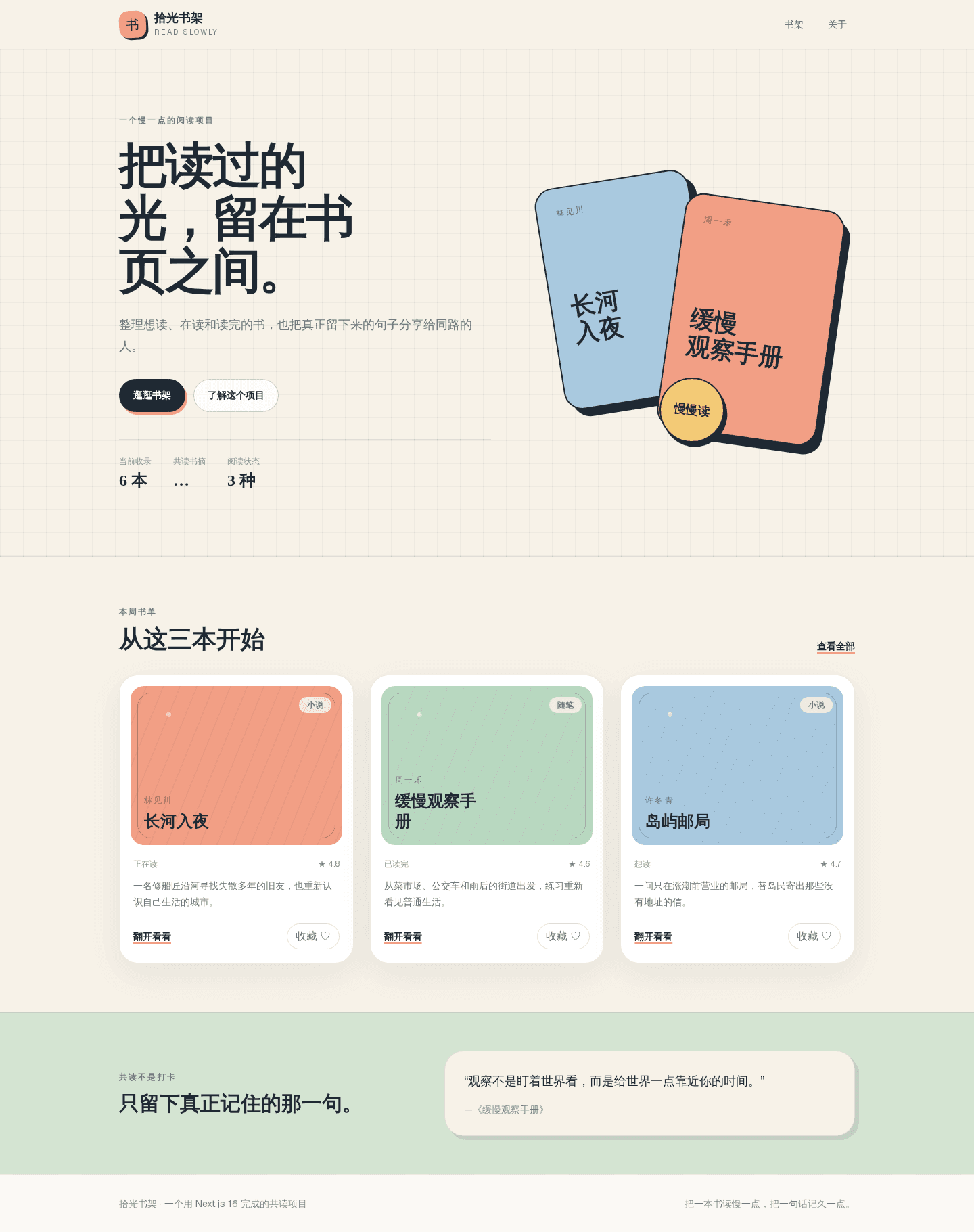
截图完成后立刻删除 await new Promise(...),让 NoteCount 恢复为本节给出的最终版本,再刷新确认计数回到“1 条”。如果忘记删除,功能虽然仍能工作,每次请求却会无意义地多等待 1.5 秒。
再打开书架和一本详情页:
http://localhost:3000/books
http://localhost:3000/books/the-long-river
六张书卡与《长河入夜》详情都应正常显示。连续进入两本不同书的详情页,标题、摘录与进度会随 slug 改变,这验证了书籍缓存键仍然正确。
本课的页面变化很小,服务器执行方式却已经分开:书籍复用缓存,读后感计数按请求读取。
用生产构建验证当前架构
生产构建会真正分析预渲染边界。先在运行开发服务器的终端按 Ctrl+C 停止进程,避免开发与构建同时写入 .next。Next.js 16 的 next build 不再自动执行 ESLint,所以先运行类型检查:
npm run typecheck没有错误后,再运行 ESLint:
npm run lint两项静态检查通过以后,执行生产构建:
npm run build三条命令的职责彼此独立:typecheck 读取 tsconfig.json 并检查类型,但不生成 JavaScript;lint 读取 ESLint 配置,发现 Hook 依赖、危险写法和代码规范问题;build 才会清理并写入 .next、编译应用、分析路由和执行预渲染。任意命令以非零退出码结束,都应先修复它报告的问题,再继续下一道门。
常见错误是让 next dev 与 next build 同时操作同一个 .next。两者都可能更新构建文件,结果会出现难以复现的缺失模块或锁冲突。因此构建前停止开发进程,构建完成后再选择启动生产结果或重新进入开发流程。
构建开头应确认版本与功能:
▲ Next.js 16.2.10 (Turbopack)
- Cache Components enabled
这一阶段只核对两个与本课架构直接相关的结果。
首页必须是部分预渲染
路由摘要中的 / 应使用 ◐,表示 Partial Prerender:
◐ /如果首页显示为完全静态,重新检查 getNotes() 是否误加了 'use cache';如果构建报告未缓存数据位于 Suspense 之外,检查页面顶层是否仍在等待 getNotes()。
书籍缓存应带有时间策略
使用 getBooks() 或 getBook(slug) 的预渲染结果会体现 cacheLife("hours"),构建摘要中可看到 1 小时重新验证与 1 天过期:
Revalidate  1h
Expire      1d
书架与详情的具体符号会受动态参数外壳影响,本课不复制一张包含后续功能的固定路由表。这里只确认 books 数据成功缓存,以及首页因未缓存的 NoteCount 得到部分预渲染。
构建摘要中的常见符号含义如下:
◐ / 是本课最直接的验收结果:缓存书籍已经进入首页外壳,未缓存读后感计数仍保留请求时读取。
构建通过后,可以启动刚生成的生产结果:
npm run start再次访问首页。固定内容应立即可见,读后感计数由服务器在请求时补入,最终显示持久文件中的当前数量。
生产结果核对完成后按 Ctrl+C 停止 next start,再执行 npm run dev。后续两课还要继续修改搜索和写入代码,开发服务器才能在保存后增量更新;不要让生产进程与开发进程同时占用端口。
为后续写入保留正确刷新方式
第 8 课会创建读后感表单和写入操作。因为 getNotes() 没有缓存,写入成功后不需要失效 notes 标签,也不应该凭空创建这样一个标签。
那一课的 Server Action 只负责校验、写入持久文件并返回成功 state,不在 Action 内刷新路由。NoteForm 收到成功 state 后,客户端 useEffect 再调用 router.refresh()。这样成功消息先进入客户端状态,随后新的服务器渲染重新执行未缓存的 getNotes(),首页计数或共读墙列表便能读到最新文件内容。
表单提交
→ 服务器校验
→ 写入持久文件成功
→ Server Action 返回 success state
→ NoteForm 显示成功消息
→ 客户端 useEffect 调用 router.refresh()
→ Suspense 内重新执行 getNotes()
→ 合并最新读后感,保留成功 state
router.refresh() 在这里有效,是因为数据函数本身没有缓存。它会请求新的 Server Component 结果,并在不丢失现有客户端 state 的情况下合并新树。如果未来把读后感迁移到带独立缓存失效能力的数据库查询层,再根据新的存储架构重新选择标签策略。
不要在 Server Action 内抢先调用 refresh()。那会让路由树更新先于客户端接住返回的成功 state,成功消息可能不可见。应先返回 state,再由 NoteForm 的客户端 effect 调用 router.refresh()。
排查常见缓存问题
'use cache' 无法使用
检查 next.config.ts 是否写了 cacheComponents: true,再确认修改配置后已经重启开发服务器。指令必须位于异步函数体开头,不能写在普通条件分支里。
首页构建提示缺少 Suspense
确认页面顶层不再使用 Promise.all([getBooks(), getNotes()])。只有缓存的 getBooks() 可以在首页顶层等待,未缓存的 getNotes() 应留在 NoteCount 中,并由 Suspense 包裹。
首页一直显示旧计数
检查 getNotes() 是否还残留 'use cache'、cacheLife 或 cacheTag。这三个声明都应从读后感函数中移除。还要确认页面展示的是 <NoteCount />,而不是构建阶段取得的 notes.length 变量。
不同详情页显示同一本书
确认 getBook 保留 slug 参数:
export async function getBook(slug: string) {
  "use cache";
  const books = await getBooks();
  return books.find((book) => book.slug === slug);
}
Next.js 会把参数纳入缓存键。不要把当前 slug 藏进会变化的全局变量,也不要让所有详情页调用没有参数的缓存函数。
为什么不能缓存 getNotes 再依赖 router.refresh
router.refresh() 会请求新的服务器组件结果,但不会自动宣布某个数据缓存已经失效。如果 getNotes() 自己仍有缓存,重新渲染也可能继续得到旧数组。
怎样保证写入后读到持久文件当前内容?
练习与回顾
到这里,拾光书架已经按数据生命周期建立缓存:books 使用 'use cache'、cacheLife 与 cacheTag,运行期可写的 notes 不缓存;首页再用 Suspense 把缓存外壳与新鲜计数组合起来。下一课会把 URL 搜索放进另一处 Suspense,第 8 课则会完成持久写入,并在成功后刷新当前路由。