异步数据与动态详情页
书架上已经有书卡,也有能记住状态的收藏按钮。现在点击“翻开看看”,我们希望进入真正属于这本书的页面:网址包含书的 slug,标题会跟着书名变化,找不到的书会得到清楚的 404,数据等待或意外失败时也有对应界面。
这正是 App Router 把路由、异步数据和页面状态放在一起的地方。本课完成后,/books/the-long-river 会展示《长河入夜》,其他书也会复用同一份页面代码。
先理解异步页面如何生成
Server Component 可以直接写成 async 函数。页面需要数据时,不必先在浏览器渲染一个空壳,再通过 useEffect 发请求;服务器可以先等待数据,随后把带有真实内容的组件结果交给 Next.js。
一个异步页面常见的执行顺序是:
Next.js 根据网址匹配 app 目录中的路由文件,并把动态片段整理成 params。
页面或布局等待 params,再调用服务器数据函数。读取文件、数据库查询或服务器端 fetch 都可以发生在这里。
数据准备好以后,Server Component 返回 JSX。Next.js 生成 RSC Payload,并为首次访问准备 HTML。
如果某一段等待较久,最近的 loading.tsx 或 <Suspense> fallback 可以先出现;如果抛出未处理错误,最近的 error.tsx 会接住它。
这里没有要求所有数据都依次等待。互不依赖的任务应尽早开始并行执行,真正有依赖关系的任务才需要排队。
并行读取互不依赖的数据
拾光书架首页同时需要书籍和读后感。两份数据互不依赖,如果先等书籍、再等读后感,总耗时会接近两次等待之和。Promise.all 可以让两项工作同时开始。
打开 src/app/page.tsx。上一课已经写成并行版本,所以这里不替换完整首页,只用一份明确 diff 对照“串行等待”与当前写法;如果你的代码已经是加号一侧,就不需要再次修改:
diff
 export default async function HomePage() {
-  const books = await getBooks();
-  const notes = await getNotes();
+  const [books, notes] = await Promise.all([getBooks(), getNotes()]);
   const featuredBooks = books.slice(0, 3);
数组中的 getBooks() 和 getNotes() 会先各自返回 Promise,Promise.all 再等待两者全部完成。结果顺序与传入顺序一致,所以第一项解构为 books,第二项解构为 notes。
减号一侧先等书籍完成,之后才调用 getNotes();加号一侧在构造数组时就依次调用两个函数,两项异步工作都已开始,随后只做一次统一等待。输入是两个 Promise,输出是一个按原顺序排列的结果元组,完成快慢不会交换 books 与 notes。
不要先写 const books = await getBooks(),再把已经完成的 books 放进 Promise.all;那不会消除等待瀑布。也不要为了并行把存在依赖的步骤拆开,例如第二个查询需要第一个查询产生的用户 ID 时,就必须先得到 ID。
如果第二个请求必须使用第一个请求的结果,就不要强行并行。例如,先查当前读者,再用读者 ID 查询权限,这两步存在数据依赖,应按顺序等待。
Promise.all 中任意一项失败,整体就会拒绝并把错误交给上层。它解决的是等待瀑布,不是错误恢复;页面仍需要 error.tsx 提供失败界面。
用文件夹声明动态路由
六本书不需要六份页面文件。App Router 用方括号文件夹声明动态片段:
text
src/app/books/[slug]/page.tsx这里的 [slug] 会匹配 /books/ 后面的一个路径片段。
Next.js 16 中,动态页面收到的 params 是 Promise。为了让这一阶段的代码可以直接保存运行,先把 src/app/books/[slug]/page.tsx 写成下面的最小完整版本;本章后半会在同一数据流上扩展正式界面:
tsx
import { notFound } from "next/navigation";
import { getBook } from "@/lib/data";

type BookPageProps = {
  params: Promise<{ slug: string }>;
};

export default async function BookDetailPage({ params
类型声明的职责是准确描述框架输入:params 最终兑现为一个含 slug 的对象。Page 的输入不是自己从 window.location 解析出的字符串,而是 App Router 完成地址匹配后提供的 Promise;输出则是稍后返回的详情 JSX。
两次等待存在先后依赖。只有先 await params 得到 slug,才能把它传给 getBook;只有书籍查询完成,页面才能决定渲染详情还是 404。常见错误是同步读取 params.slug、为了消除报错而把 props 类型改成普通对象,或在服务器 Page 中转而读取浏览器的 location。
这不是为了模拟慢请求。Next.js 16 把 params、页面的 searchParams、cookies() 和 headers() 等请求时数据统一改成异步 API,让框架能够更清楚地区分预渲染工作与必须等请求到来才能完成的工作。
旧教程常写 params.slug。在 Next.js 16 的类型下,params 是 Promise,必须先 await params。不要通过 as 强制断言绕过它,否则只是把错误藏到运行阶段。
提前列出可以生成的详情页
项目的数据文件已经包含六个稳定的 slug。generateStaticParams 可以在构建时返回这些参数,让 Next.js 提前生成对应详情路由。
在 src/app/books/[slug]/page.tsx 中扩展现有数据导入。下面的 diff 只改这一行:
diff
-import { getBook } from "@/lib/data";
+import { getBook, getBooks } from "@/lib/data";
然后在已有 BookPageProps 之后加入函数,不要把类型再声明一次:
tsx
export async function generateStaticParams() {
  const books = await getBooks();
  return books.map((book) => ({ slug: book.slug }));
}生产构建调用这个函数时,getBooks() 读取六条数据,map() 把每条 Book 缩减为框架真正需要的 { slug }。输入是书籍数组,输出是动态片段参数数组;书名、评分等字段不会进入路由参数。返回对象的属性名必须和文件夹 [slug] 完全一致,若文件夹改成 [id],这里也必须返回 { id: ... }。
不要返回单纯的字符串数组,也不要把 generateStaticParams 当成授权或存在性检查。它只告诉构建器哪些地址值得提前生成,默认仍允许其他 slug 在请求时尝试渲染。构建完成后若数据集合改变,已经生成的产物不会凭空知道新增条目;后续缓存与发布策略需要决定何时重新生成。
返回值必须与动态片段同名。文件夹叫 [slug],因此对象写成 { slug: book.slug }。如果文件夹叫 [id],对象属性也应改成 id。
这份函数会从当前六本书生成六组参数:
text
the-long-river
slow-observation
island-post-office
tiny-web-garden
museum-after-rain
morning-star-map默认情况下,generateStaticParams 不会自动禁止其他参数。访问一个列表之外的 slug 时,Next.js 仍可尝试处理请求;拾光书架的 getBook 查不到记录后会调用 notFound(),所以用户最终看到的是项目自己的 404 页面。
为每本书生成独立的页面信息
如果所有详情页都使用同一个浏览器标题,用户在标签页、历史记录和搜索结果中很难分辨它们。动态路由可以导出 generateMetadata,根据当前书籍生成标题和描述。
现有文件已经导入 notFound,所以这里只新增 Metadata 类型导入。把它放在文件第一行,不要重复写第二条 notFound 导入:
tsx
import type { Metadata } from "next";再加入 metadata 函数:
tsx
export async function generateMetadata({
  params,
}: BookPageProps): Promise<Metadata> {
  const { slug } = await params;
  const book = await getBook(slug);

  if (!book) notFound
Metadata 的运行流和页面很相似:等待参数 → 用 slug 查书 → 缺失时终止 → 把书名与摘要返回给框架。返回值不是 JSX,Next.js 会把它转换为文档标题与描述;根布局再将 book.title 放进 %s,所以页面代码无需自己拼“|拾光书架”。
generateMetadata 与默认 Page 是两个独立入口。在这一课的无缓存数据模块中,它们都调用 getBook(slug),因此一次生成可能读取同一本书两次;这样写先保持职责清楚,第 6 课再在数据函数层统一缓存,而不是让 Metadata 偷用页面内部变量。不要在这里返回 <title> 元素,也不要用 book! 掩盖未找到分支。
根布局已经定义了标题模板 %s|拾光书架。因此,《长河入夜》的详情页最终会得到“长河入夜|拾光书架”。描述则来自这本书的 summary。
notFound() 会中断当前路由的渲染并交给 not-found.tsx。它的返回类型是 never,所以经过 if (!book) notFound() 以后,TypeScript 能确认后面的 book 一定存在,不需要非空断言。
generateMetadata 与页面函数是两个独立入口,都应能根据 slug 正确取得数据。下一课给 getBook 加上 'use cache' 后,相同书籍的读取可以复用缓存结果,而页面不需要改变调用方式。
完成书籍详情界面
路由与页面信息准备好后,我们来完成真正可见的详情内容。页面会显示封面、作者、评分、收藏状态、摘要、摘录、阅读进度和标签。
把 src/app/books/[slug]/page.tsx 整理成下面的完整版本:
tsx
import type { Metadata } from "next";
import Link from "next/link";
import { notFound } from "next/navigation";
import { FavoriteButton } from "@/components/favorite-button";
import { getBook, getBooks } from "@/lib/data";

type BookPageProps = {
  params
页面本身仍是 Server Component。它可以等待 getBook,然后把一个字符串 slug 传给客户端的 FavoriteButton。这正是上一课建立的“服务器页面加最小客户端岛”结构。
这份文件同时承担三个彼此独立但共享数据入口的职责:generateStaticParams 给构建器参数,generateMetadata 给文档头信息,默认导出的 BookDetailPage 给用户可见界面。请求 Page 时,代码按“等待 slug → 查询 Book → 检查 undefined → 读取字段”的顺序执行。notFound() 必须出现在访问 book.title 等属性之前,否则未知地址会先触发 JavaScript 错误,错误边界会误把正常 404 当成服务器故障。
页面主体使用 article,书名是唯一的 h1。外层网格默认单列,md:grid-cols-[.8fr_1.2fr] 在空间足够时把封面和正文分开。封面同时拥有 sticky top-28 和定位上下文,滚动长正文时会停在页头下方;底部分类文字使用绝对定位,以这张封面为参照。若把定位类删掉,绝对定位子项可能跑到意外祖先上。
评分、摘要、摘录、进度和标签都来自同一 Book。只有 FavoriteButton 需要浏览器脚本,跨边界输入仍只是可序列化的 slug。标签 map() 以标签文字作为 key,依赖同一本书内标签不重复;如果数据允许重复,应改用真正唯一的标签 ID,而不是简单换成数组下标。
cover-${book.accent} 继续使用全局 CSS 中明确存在的六个封面类。style={{ width: ... }} 的外层花括号进入 JavaScript,内层花括号创建 React style 对象,模板字符串最终得到 "68%" 这样的 CSS 值。当前种子数据由项目维护;若 progress 来自用户或接口,必须在数据边界检查数值并限制到 0–100,不能把类型为 number 当成范围已经安全。
进度条的宽度来自数据:
tsx
style={{ width: `${book.progress}%` }}这里传给 style 的是普通对象,最终值如 68%。progress 的类型是数字,并且来自项目数据;如果它来自用户输入,还应先把范围限制在 0 到 100。
为等待、失败与不存在准备界面
一个完整页面不只设计成功状态。数据可能还在等待,网址可能不存在,读取也可能意外失败。App Router 用特殊文件把这些状态放到对应路由段旁边。
等待时显示骨架屏
创建 src/app/books/loading.tsx:
tsx
export default function LoadingBooks() {
  return (
    <div className="mx-auto max-w-6xl px-5 py-14 lg:px-8">
      <div className="h-12 w-40 animate-pulse rounded-2xl bg-white" />
      <div className="mt-10 grid gap-6 md:grid-cols-3">
        {[1, 2, 3].map((item
loading.tsx 会为 books 路由段自动建立 Suspense 边界。通过客户端导航进入 /books 或它下面的详情路由时,如果内容尚未准备好,Next.js 可以先显示这份骨架屏,并保留外层共享布局。
数组 [1, 2, 3] 不是业务数据,只用于稳定生成三块等高骨架;数字可安全作为 key,因为这三项不会插入、删除或重新排序。animate-pulse 表达“内容仍在准备”,但骨架没有链接和伪造书名,用户不会误操作尚不存在的内容。
文件位于 app/books,所以列表与所有详情共用它。这样文件少,但详情等待时也会看到三卡片形状;若项目希望骨架精确匹配左右两栏详情,应另建 app/books/[slug]/loading.tsx 作为更近边界。不要为了确保肉眼看见骨架而永久保留人为延迟,真实数据足够快时直接显示内容正是理想结果。
找不到书时显示 404
在 src/app/not-found.tsx 写入:
tsx
import Link from "next/link";

export default function NotFound() {
  return (
    <div className="mx-auto grid min-h-[65vh] max-w-2xl place-items-center px-5 text-center">
      <div>
        <p className="font-serif text-8xl font-bold text-coral">404</p>
        <h1 className="mt-4 font-serif text-3xl font-bold">
          这页像一张掉出书里的便签
页面与 generateMetadata 都在查不到书时调用 notFound(),因此错误地址不会渲染一张字段为空的详情卡,而会进入这份明确的 404 界面。
这份根级组件的输入不是异常对象,而是“当前路由主动声明资源不存在”这一控制流;输出是可恢复的说明与书架链接。最近的 not-found.tsx 会优先接管,如果以后增加 app/books/not-found.tsx,书籍 404 就会使用更具体的版本。不要把文件读取失败也改成 notFound(),否则监控和用户都会把系统故障误解成内容不存在。
未知错误进入错误边界
创建 src/app/error.tsx:
tsx
"use client";

import { useEffect } from "react";

export default function GlobalError({
  error,
  reset,
}: {
  error: Error & { digest?: string };
  reset: () => void
错误边界必须是 Client Component,因为它要接收 reset 并响应按钮点击。reset() 会再次尝试渲染出错的路由段,但它不能保证数据源已经恢复,因此界面仍要允许失败再次发生。
error 是框架捕获的异常,生产模式下可能只保留可公开信息和用于关联服务器日志的 digest;不要把堆栈或敏感字段直接展示给用户。useEffect 在浏览器记录一次错误,依赖数组 [error] 确保同一异常对象不会在每次渲染时重复记录。真实服务还应把 digest、时间和路由发送到受控监控系统,而不是只依赖浏览器控制台。
reset 没有输入,输出也不保证成功,它只是要求 React 再次尝试当前边界内的渲染。错误源仍在时,页面会再次进入相同边界。"use client" 必须位于文件第一条语句之前;遗漏它会让 useEffect 和 onClick 在 Server Component 中非法。函数名本身不决定范围,命名为 GlobalError 容易与特殊文件 global-error.tsx 混淆,理解时应以实际文件路径为准。
文件名决定边界范围。虽然这里的函数名是 GlobalError,src/app/error.tsx 仍是根路由段的错误边界;如果要捕获根布局本身的错误,需要另建 src/app/global-error.tsx,并由它提供自己的 <html> 与 <body>。
404 是预期分支,使用 notFound();读取失败、程序异常等未知问题才交给 error.tsx。不要把正常的“没有这本书”伪装成服务器故障。
打开详情页并查看结果
动态路由和状态文件都会由开发服务器按需编译。如果开发服务器仍在运行,直接继续访问;只有进程已经停止时,才重新执行:
bash
npm run dev打开下面的地址:
text
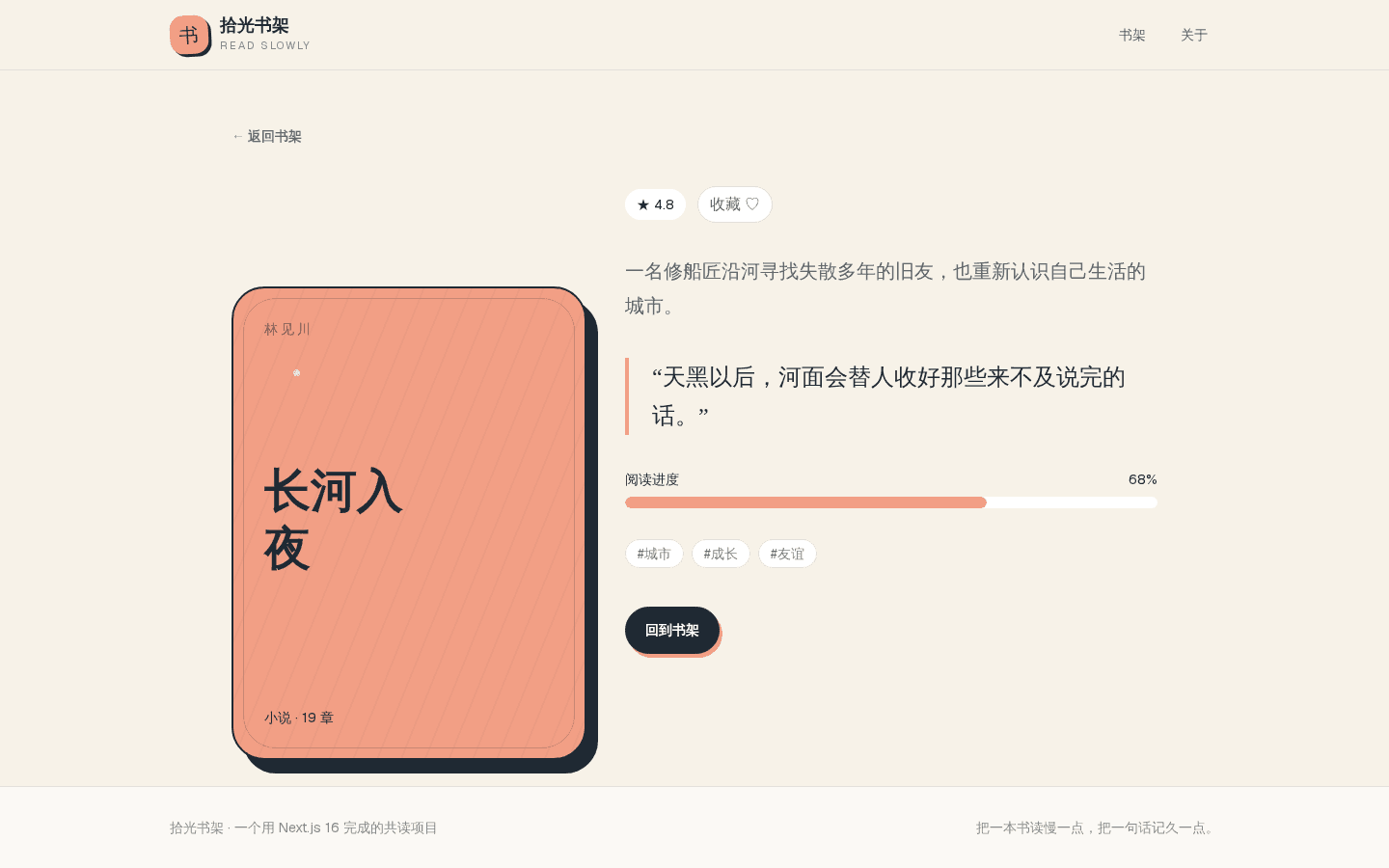
http://localhost:3000/books/the-long-river页面应显示《长河入夜》的彩色封面、4.8 评分、68% 阅读进度、三个标签,以及返回书架的按钮。浏览器标签标题会显示“长河入夜|拾光书架”。共读墙尚未创建,所以这一阶段不提供指向 /notes 的入口;第 8 课完成写入页面后再把详情行动按钮接过去。
下面是 http://localhost:3000/books/the-long-river 在本章成功状态下的真实结果。截图使用 1440×900 视口,从书架点击“翻开看看”触发动态导航后取得;请核对封面主题、作者与章节、4.8 评分、68% 进度条、三个标签、收藏按钮和返回书架链接。截图没有出现第 8 课才会建立的共读写入入口,保持了当前 checkpoint 的边界。
再访问一个数据中不存在的地址:
text
http://localhost:3000/books/not-on-the-shelf这次 getBook 返回 undefined,notFound() 会把页面切换为“这页像一张掉出书里的便签”的 404 界面。点击“回到书架”可以返回 /books。
等待界面和错误边界不能只靠“代码看起来对”来验收。下面做两次可撤销实验,观察后立即恢复源码。
先在 src/lib/data.ts 的 getBook 开头临时加入延迟:
ts
export async function getBook(slug: string): Promise<Book | undefined> {
  await new Promise((resolve) => setTimeout(resolve, 1500));
  const books = await readDataFile
保存后在新标签页直接打开 /books/the-long-river。详情数据等待期间应先出现 loading.tsx 的三块脉冲骨架,约 1.5 秒后再替换为完整书籍。看到这一过渡后,删掉临时的 await new Promise(...),避免人为延迟进入后续代码。
再在详情 Page 取得 slug 后临时抛出一个错误:
tsx
const { slug } = await params;
if (slug === "the-long-river") {
  throw new Error("用于验证详情错误边界");
}
刷新《长河入夜》页面,路由段应显示 error.tsx 中的“书页暂时翻不开”和“再试一次”,终端同时保留真正的异常信息。随后删除这段 throw,再点击“再试一次”或刷新页面,正常详情应恢复。这样 loading、预期 404 与未知异常三条路径都留下了可观察结果,实验代码也没有残留。
最后从书架页点击不同卡片的“翻开看看”。同一个 page.tsx 会根据不同 slug 读取对应数据,网址、标题和正文都随之改变。
检查异步约束
先让 TypeScript 检查 params、metadata 返回值和组件 props:
bash
npm run typecheck没有输出表示类型检查通过。再运行 ESLint:
bash
npm run lint类型与规则通过后,再执行一次生产构建:
bash
npm run buildbuild 会真正调用 generateStaticParams、生成 Metadata,并检查服务器与客户端模块能否组成生产产物。输入是当前源码、六本书数据和锁定依赖,输出是 .next 构建目录以及终端中的路由摘要;六个已知 slug 都应成功生成,命令以退出码 0 结束。开发页面能打开不代表构建一定成功,所以涉及动态参数、特殊文件或服务器专用模块时,不能只运行 dev。
如果构建提示某个动态参数缺少 slug,回到 generateStaticParams 检查属性名;如果提示 Client Component 导入 node:fs,沿导入链找到越过 server-only 边界的模块。构建完成不需要执行 npm run start 才能继续课程,第 10 课会专门解释生产运行。
如果你把页面误写成下面这样,Next.js 16 的类型检查会指出 slug 不在 Promise 上:
tsx
export default async function BookDetailPage({ params }: BookPageProps) {
  const book = await getBook(params.slug);
  return null;
}
应该怎样修正?
练习与回顾
1
首页为什么使用 Promise.all 同时调用 getBooks 与 getNotes?
2
Next.js 16 的动态页面中,要从 params 取得 slug,应先写 const { slug } = ____ params。
3
下面哪些特殊文件分别负责页面等待、未知错误和未找到状态?
4
只要导出了 generateStaticParams,所有列表之外的 slug 就会被框架自动拒绝。
现在,书架已经从一组静态卡片变成了一套完整的异步路由:数据可以并行读取,六本书共用动态页面,每本书有独立 metadata,等待、404 和异常也各有去处。下一课会解决另一个实际问题:这些服务器数据应该何时复用、何时重新计算,以及修改后怎样让用户立刻看到新结果。