使用 Spring MVC 构建应用程序
到上一节结束时,TaskHub 已经不再是只能存几条演示数据的小接口了。任务可以按状态、关键词和负责人筛选,也可以分页、排序;一次状态变更被放进事务里,失败时不会留下一半成功、一半失败的数据。对会调用 REST API 的人来说,这套能力已经够用了。
可运营同事提出的需求往往更直接:“我能不能打开一个网页,看见今天要处理的任务,点一下就标记完成?”如果我们为这个页面再写一份查询、再写一套业务规则,REST 接口和管理页面很快就会各走各的。正确的推进方式是复用现有的 TaskService,只增加一层面向浏览器的 Web 适配。
这正是 Spring MVC 擅长的范围。本节会给 TaskHub 增加 Thymeleaf 任务看板、创建表单和“完成任务”动作,同时拆开一次请求经过的真实链路。你会看到 @RequestParam、@RequestBody、@Controller 和 @ExceptionHandler 并不是几句让框架“自动处理”的咒语,它们分别被请求映射、参数解析、消息转换、视图解析和异常解析机制读取。
本课程统一使用 Spring Boot 4.1.0、Java 25 和 spring-boot-starter-webmvc。如果你搜索到的教程要求继承旧适配器、到 web.xml 里注册 Servlet,或者满篇都是 <bean>,先检查文章对应的版本。那些写法能帮助理解历史,但不是我们现在搭建 TaskHub 的起点;包名也应使用 jakarta.servlet.*,不要再复制 javax.servlet.*。
一次请求到底穿过了什么
先看一个我们已经用过的请求:
http
GET /api/tasks?status=TODO&page=0&size=10 HTTP/1.1
Host: localhost:8080
Accept: application/json
X-Request-Id: browser-8f31
控制器方法看起来只是接收四个参数:
java
@GetMapping
public TaskPageResponse list(
        @RequestParam(required = false) TaskStatus status,
        @RequestParam(required = false) String keyword,
        @RequestParam(defaultValue = "0") int page,
        @RequestParam(defaultValue = "10") int size) {
    return taskService.list(status, keyword, page, size);
}
但浏览器发来的是字节、请求行、请求头和字符串,Java 方法需要的却是 TaskStatus、int 和一个可以序列化的返回对象。中间的转换不可能由控制器凭空完成。把这条链拆开以后,大致会经过下面这些参与者。
内嵌 Servlet 容器接收连接,解析 HTTP 请求,创建 HttpServletRequest 与 HttpServletResponse。Spring MVC 基于 Servlet API 工作,因此普通同步请求通常由容器线程处理;控制器中执行阻塞式 JPA 查询时,这个线程会等待查询结束。
请求先经过 Servlet Filter 链。字符编码、CORS、Spring Security、请求体包装等逻辑通常位于这一层。Filter 运行时还不知道最终会匹配哪个控制器,它面对的是 Servlet 请求和后面的整个处理链。
DispatcherServlet 接到请求。它采用“前端控制器”模式:所有 MVC 请求先到同一个入口,再由入口把具体工作交给一组策略组件。Spring Boot 已经完成它的注册,我们不用自己写 web.xml。
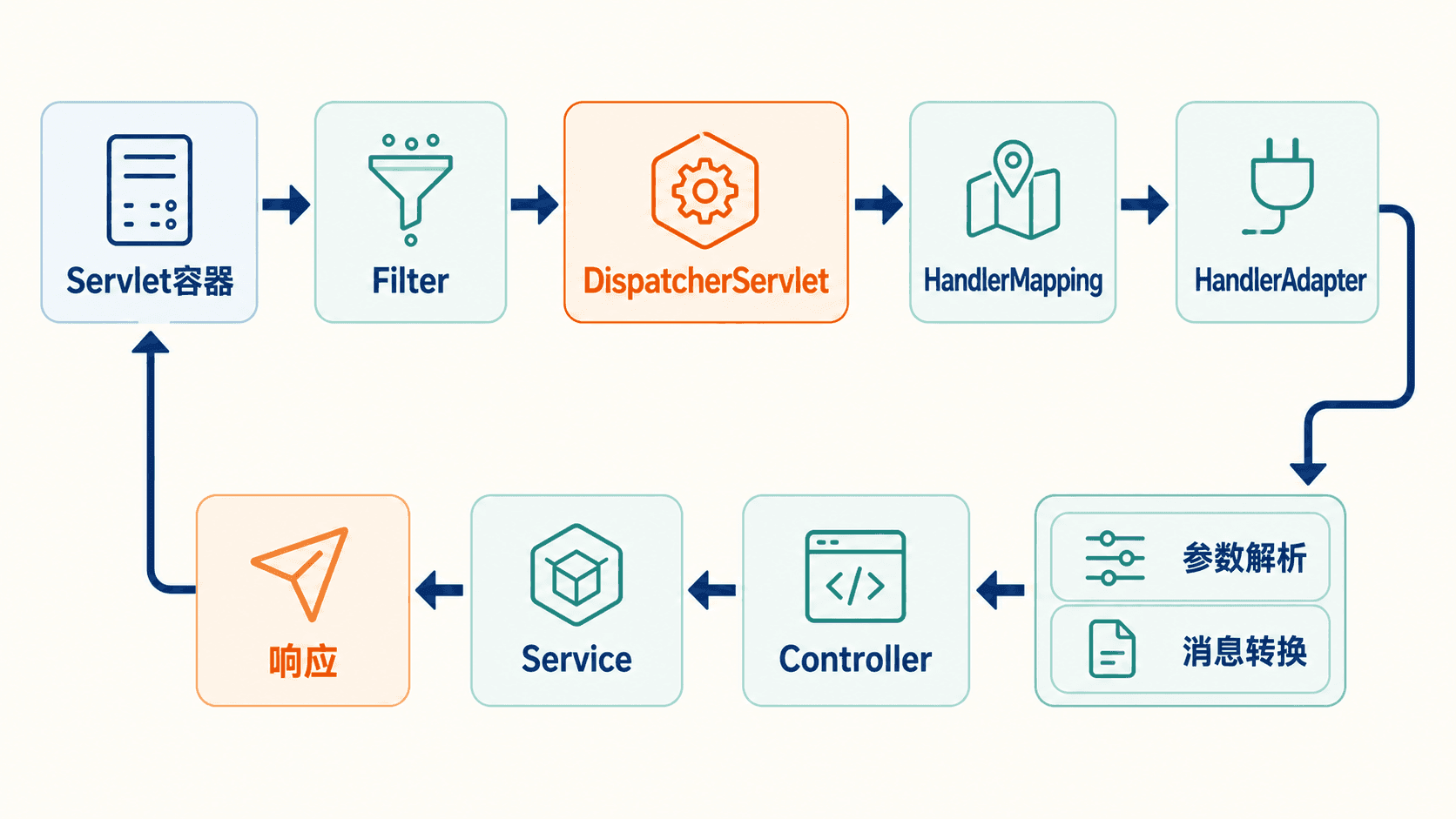
这张图里最重要的不是背类名,而是确定故障发生在哪一段。例如,地址写错导致的 404 通常还没有进入控制器;status=UNKNOWN 转枚举失败发生在参数解析阶段;Service 抛出的“任务不存在”已经越过了路由和参数绑定。排查方向由此完全不同。
DispatcherServlet 也不是亲自包办所有事情。它负责一套稳定的调度算法,HandlerMapping、HandlerAdapter、HandlerExceptionResolver、ViewResolver 等组件负责可替换的细节。这就是 Spring MVC 看似“注解很多”,实际却能扩展而不必改核心入口的原因。
映射不是收到请求以后才扫描
这里还有一个常被误解的细节:Spring MVC 并不会在每次请求到来时遍历所有 Controller,再用反射挨个查注解。应用上下文刷新时,负责注解映射的 RequestMappingHandlerMapping 会找到 Controller Bean,读取类型和方法上的映射条件,提前建立“请求条件到 HandlerMethod”的注册表。请求到来后做的是路径与条件匹配,不是重新扫描项目。
这也解释了两种故障为何出现得很早。如果两个方法声明了无法区分的相同映射,应用可能在启动阶段就因为映射冲突而失败;如果 Controller 放在主应用组件扫描范围之外,它根本不会成为 Bean,自然也不会进入映射注册表,发多少请求都只会得到 404。看到这种问题时,继续给方法打断点没有帮助,应该回到启动日志、包结构和映射条件。
一次匹配也不只看 URL。HTTP 方法、请求参数条件、请求头条件、consumes 和 produces 都可能参与选择。比如同样是 /api/tasks,GET 和 POST 能落到不同方法;同样是 POST,请求声明 Content-Type: application/json 才能匹配只消费 JSON 的处理方法。路径只是选择 Handler 的一部分。
HandlerMapping 返回的执行链中同时包含 Handler 和适用的 Interceptor。DispatcherServlet 先让执行链调用 preHandle;全部放行后,才把 Handler 交给 HandlerAdapter。适配器为方法的每个参数寻找解析器,方法正常返回时还要选择返回值处理器。于是“进入了 Controller”并不是一个笼统瞬间:匹配成功以后,仍可能在参数解析、数据绑定或校验阶段失败,方法体一行都没有执行。
请求体还有一个现实限制:底层输入流通常只能顺序读取一次。日志代码如果在 Filter 里直接把请求体读完,又没有用可重复读取的包装器,后面的 @RequestBody 就可能看到空内容。这类问题表面上像 Jackson 失效,实际是更早的组件消费了输入流。对请求体做审计、签名或日志时,必须考虑缓存上限、敏感字段脱敏和大文件请求,不能简单 readAllBytes()。
异常也未必都能交给 @ControllerAdvice。路由、参数解析和 Controller 执行期间的异常通常处于 DispatcherServlet 的解析范围;连接在容器层被拒绝、Filter 在进入 DispatcherServlet 前抛错,或响应已经提交后才失败,处理路径会不同。统一错误格式要先明确覆盖边界,不能假定一个 Advice 能拦住整个服务器里发生的一切。
这和 WebFlux 不是同一条执行链
Spring MVC 是 Servlet 栈,核心入口是 DispatcherServlet,允许当前线程执行阻塞调用。Spring WebFlux 的核心入口叫 DispatcherHandler,建立在响应式服务器抽象上,处理链假定代码不会阻塞,并使用 Mono、Flux 表达异步结果。
两边都有 @GetMapping,不代表底层相同。Servlet Filter、HttpServletRequest 以及 MVC 的 HandlerInterceptor 也不能原样搬到 WebFlux。TaskHub 目前使用 JPA,数据库访问本身会阻塞,所以普通 CRUD 和管理页面留在 MVC 很合理。下一节需要持续推送任务动态时,我们会单独建立 WebFlux 应用,不把 JPA 调用硬塞进事件循环。
为什么不能把所有东西都写进 Controller
刚学 Spring MVC 时,很容易把 Controller 当成“请求进来以后写代码的地方”。于是一个看板方法逐渐长成这样:
java
@GetMapping("/tasks")
public String tasks(
        @RequestParam(required = false) String keyword,
        @RequestParam(defaultValue = "0") int page,
        Model model) {

    var pageable = PageRequest.of(page, 20,
它暂时能显示页面,但已经把 HTTP 参数、分页规则、查询语句、业务统计、实体对象和视图模型揉在一起。接下来只要发生一件小事,麻烦就会显现:
- REST API 也想展示同一套筛选结果,只能复制查询。
- 测试“逾期任务怎么算”时,必须连 Controller、Servlet 模拟对象和数据库一起启动。
- 数据库查询换一种实现,页面控制器也跟着改。
- 模板访问仍处于持久化状态的实体,稍不注意就会遇到懒加载、序列化或额外查询。
- 事务边界落在 Web 层,多个写操作失败时很难判断哪些应该回滚。
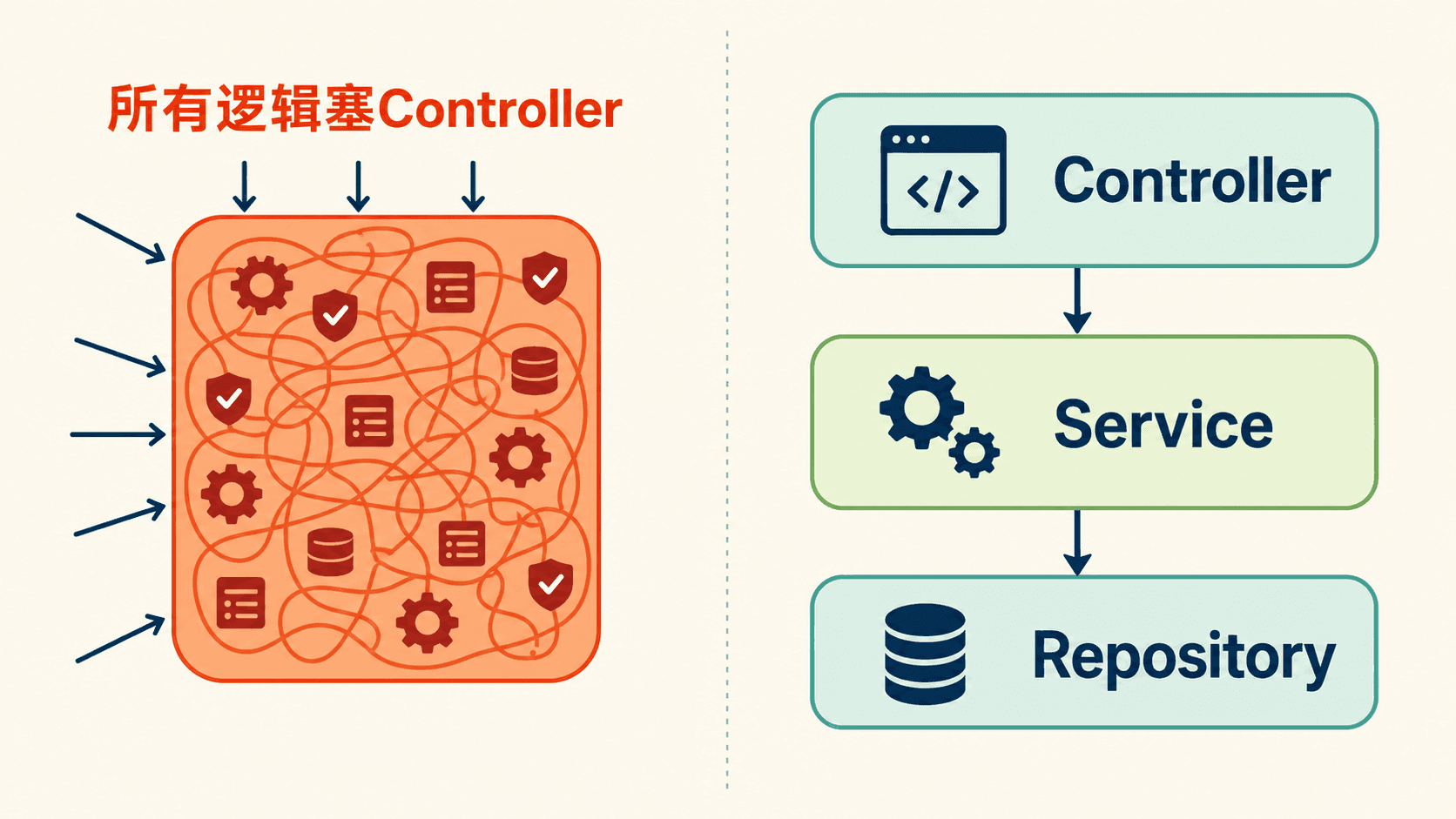
分层不是为了多建几个文件。每层只保留一种变化频率:
TaskHub 的 REST 接口和管理页面因此可以共享 TaskService,但不必共享展示方式。REST 返回稳定的 API DTO;页面控制器把同一份服务结果放进 Model,再交给模板。以后把页面换成前端单页应用,Service 不需要因为视图技术变化而重写。
“Controller 要薄”不等于它只能有一行。读取请求参数、选择 HTTP 状态码、决定返回 JSON 还是视图、处理表单校验结果,都属于 Web 层职责。真正应该移走的是可以脱离 HTTP 独立成立的业务规则和持久化操作。
分层以后,每层应该怎样测试
分层带来的第一个实际收益是测试范围变得可选择。TaskService 的业务规则可以在不构造 HTTP 请求的情况下直接测试:给它一个仓库替身,调用 complete(id),检查任务状态是否变成 DONE。Repository 查询可以用 JPA 切片测试验证 JPQL、分页和排序。Controller 再用 MockMvc 验证路径、参数绑定、状态码、视图名和错误体。失败时,你会知道是业务规则、数据库查询还是 Web 适配出了问题。
第二个收益是同一用例能被多个入口复用。“完成任务”既可以由 HTML 表单触发,也可以由 REST 接口触发,甚至以后由定时任务触发。三个入口最终都调用 Service 中的业务动作。Service 不接收 HttpServletRequest,也不返回 ModelAndView,因此它不需要知道调用者是谁。
第三个收益是事务位置清楚。Controller 负责一次 HTTP 交互,Service 负责一次业务操作;业务操作里读任务、判断当前状态、更新状态和记录审计应在同一事务边界内。若把 @Transactional 随意放在 Controller,事务会包住模板准备或网络适配,让数据库连接占用更久,也让未来非 HTTP 调用无法复用同一边界。
分层不等于为每个类机械创建接口。TaskService 只有一个实现时,可以先直接注入具体类;Repository 接口有运行时代理,天然需要契约。什么时候抽接口,应由替换实现、模块边界或测试策略决定,不是因为文件夹名叫 service 就必须再造一层空壳。
给 TaskHub 增加任务看板
项目已经包含 Thymeleaf starter,所以不需要手工创建模板引擎。Spring Boot 会配置 MVC 需要的视图解析能力,并把默认模板位置指向 classpath:/templates/。现在新增页面控制器:
java
package com.welearn.taskhub.web;

import com.welearn.taskhub.task.TaskService;
import com.welearn.taskhub.task.TaskStatus;
import org.springframework.stereotype.Controller;
import org.springframework
@Controller 会让这个类成为容器里的 Bean,也会让 MVC 在启动时发现它的方法。它与 @RestController 的关键差别在返回值语义:@RestController 可以理解为 @Controller 再加上类级别的 @ResponseBody,所以返回对象会写进响应体;普通 @Controller 返回 "tasks" 时,这个字符串是逻辑视图名。
Model 也不是我们手动创建的。参数解析器看到这个类型后提供当前请求的模型对象。方法把筛选结果和筛选条件放进去,视图解析器再把 "tasks" 解析到 templates/tasks.html。
下面的模板保留任务筛选和分页所需的最小结构:
html
<!doctype html>
<html lang="zh-CN" xmlns:th="http://www.thymeleaf.org">
<head>
    <meta charset="UTF-8">
    <title>TaskHub 任务看板</title>
</head>
<body>
<main>
    <h1>任务看板</
th:text 写入的是文本节点,Thymeleaf 默认会进行 HTML 转义。任务标题里即使出现 <script>,它也只会作为文字显示,不会直接变成可执行标签。只有确实要渲染受信任 HTML 时才考虑非转义输出;用户提交的描述不属于“受信任 HTML”。
访问页面时可以直接观察响应类型:
bash
curl -i -H 'Accept: text/html' \
  'http://localhost:8080/tasks?status=TODO&page=0'
text
HTTP/1.1 200
Content-Type: text/html;charset=UTF-8
X-Request-Id: 7bb8c9f2-8b40-4d68-bf0b-0c9837fb351e

<!doctype html>
<html lang="zh-CN">
...
这次 TaskService 返回的仍是第 6 节建立的稳定分页数据。变化只发生在 Web 层:REST 返回 JSON,页面控制器返回模型与视图。
从视图名到 HTML 的最后一段
控制器返回 "tasks" 后,MVC 会把它当成逻辑名称,而不是文件内容。视图解析器找到对应的 Thymeleaf View,模板引擎再用当前 Model 建立表达式上下文。taskPage、statuses 和 keyword 因而能通过 ${...} 被读取。模板最终渲染出的字符串写入 Servlet 响应,Content-Type 也在这一阶段确定。
这个边界能避免一个常见混乱:Controller 不应该自己拼 HTML 字符串,模板也不应该回头调用 Repository。Controller 决定“给视图哪些数据”,模板决定“数据摆在哪里”。如果某项显示逻辑复杂到包含业务判断,例如“任务是否逾期且需要升级”,先在 Service 或专用展示模型中算成清晰字段,再让模板只做条件展示。
页面模型也不应该直接塞入整张实体图。课程已经关闭 Open Session in View,数据库会话不会一直拖到模板渲染。这样做看似少了“随时访问懒加载属性”的便利,却能迫使查询和数据准备发生在 Service 的事务内,避免模板循环中悄悄追加几十条 SQL。页面真正需要负责人姓名、标签和截止日期,就让查询或 DTO 明确提供这些字段。
任务看板比再次演示 CRUD 多做了一件有业务价值的事:它把第 6 节的筛选与分页转成可以直接使用的工作入口。使用者保留筛选条件翻页,看到截止时间,并能从列表触发明确的业务动作。页面的价值来自组合已有能力,不来自复制数据库逻辑。
表单绑定、校验与 PRG
任务看板还需要一个创建入口。表单提交与 JSON 请求体看起来都在“传字段”,但它们走的解析机制不同。浏览器表单通常使用 application/x-www-form-urlencoded,适合通过 @ModelAttribute 绑定;JSON 则由 @RequestBody 交给消息转换器读取。
先定义页面自己的表单对象,不让 JPA 实体直接接收外部输入:
java
package com.welearn.taskhub.web;

import jakarta.validation.constraints.Max;
import jakarta.validation.constraints.Min;
import jakarta.validation.constraints.NotBlank;
import jakarta.validation.constraints.
页面控制器增加 GET 和 POST:
java
@GetMapping("/new")
String createForm(Model model) {
    model.addAttribute("form", new TaskForm("", "", 3, null));
    return "tasks/new";
}

@PostMapping("/new")
String create(
@ModelAttribute("form") 让 MVC 从请求参数创建并绑定 TaskForm。@Valid 要求绑定完成后执行 Bean Validation。最容易踩坑的一点是:BindingResult 必须紧跟在被校验的表单参数后面。这样校验错误才会进入当前结果对象,方法也能把原表单与错误信息重新交给模板。
模板中的字段与错误提示可以这样写:
html
<form th:action="@{/tasks/new}" th:object="${form}" method="post">
    <input type="hidden"
           th:name="${_csrf.parameterName}"
           th:value="${_csrf.token}">

    <label for="title">标题</label>
    <input id="title" th:field="*{title}"
输入空标题时,POST 请求直接返回表单页面并显示“标题不能为空”,此时状态仍是 200,因为用户需要修改同一份表单。输入合法时,控制器不直接渲染成功页面,而是返回 redirect:/tasks。浏览器先收到 302,再发起一次 GET:
text
POST /tasks/new
        │
        ├── 校验失败 ──> 200 + 原表单与字段错误
        │
        └── 创建成功 ──> 302 Location: /tasks
                              │
                              └── GET /tasks ──> 200 + 新看板
这叫 Post/Redirect/Get,简称 PRG。它解决的不是页面美观,而是浏览器刷新问题:如果成功后仍停留在 POST 响应上,用户按刷新可能再次提交同一任务;重定向后,地址栏和历史记录停在安全的 GET 请求上。Flash Attribute 只跨这一次重定向保存,所以成功提示显示一次后就消失。
“完成任务”也应该是 POST,而不是 GET。GET 可能被浏览器预取、搜索引擎访问或缓存系统重放,它的语义应当是读取,不应悄悄修改状态:
java
@PostMapping("/{id}/complete")
String complete(
        @PathVariable long id,
        RedirectAttributes redirectAttributes) {
    taskService.complete(id);
    redirectAttributes.addFlashAttribute("message", "任务已完成");
    return "redirect:/tasks";
}
java
@Transactional
public void complete(long id) {
    var task = findTask(id);
    task.setStatus(TaskStatus.DONE);
}
页面中的 POST 表单保留 CSRF 隐藏字段。现在先把它理解成“证明这个写请求来自应用发出的表单”的随机令牌;Spring Security 的过滤器链会在第 10 节完整展开。不要为了让 POST 暂时好调就全局关闭 CSRF。
绑定成功不代表业务输入可信
数据绑定器的任务是把文本放进 Java 对象,Bean Validation 的任务是检查声明式约束。它们都不会替你完成全部业务判断。例如 dueDate 能成功解析为日期,并不代表这个日期符合“完成任务时不能修改截止日”的规则;标题长度合规,也不代表同一项目中允许出现重复任务。涉及数据库现状、当前用户权限或状态迁移的规则仍应放在 Service。
表单对象单独存在也能缩小绑定范围。如果直接把请求绑定到 Task 实体,后来实体新增 status、version 或内部审计字段时,这些属性可能在你没有注意的情况下成为可提交字段。专用 TaskForm 只暴露页面允许填写的四项,再显式转成 CreateTaskRequest,外部输入边界一眼可见。这种做法也被称为避免过度绑定或批量赋值风险。
类型转换错误与约束错误会一起进入 BindingResult。用户在数字框里输入无法转换的内容时,绑定器会记录字段错误;数字成功变成 int 后,@Min、@Max 再判断范围。模板不必区分底层是哪种异常,只要在对应字段旁显示可理解的信息即可。服务端保留更具体的日志,页面文案不要直接暴露转换器类名。
失败时直接返回 "tasks/new",不是重定向。因为重定向会创建新请求,当前 BindingResult 和用户输入不会自动保留。成功时才使用 PRG,因为这时不再需要保留字段错误,并且要避免重复提交。把“无论成功失败都 redirect”当成固定套路,会迫使你手动搬运整份错误对象,反而更复杂。
Flash Attribute 与普通查询参数也不同。成功消息适合短暂保存在服务端的 FlashMap 中,下一次请求取出后删除;筛选条件需要可复制、可收藏,所以应该留在 URL 查询串里。哪些数据跨重定向、哪些数据进入地址栏,要按语义选择。
最后再看 CSRF:隐藏字段不是输入校验的替代品,它只参与确认请求来源。标题长度、任务状态、访问权限仍需各自校验。安全机制往往是多层叠加,不能因为表单里出现一个 token 就把业务字段当成可信数据。
参数解析器如何把字符串变成 Java 参数
一个控制器方法可以同时声明路径变量、查询参数、请求头、JSON 对象和文件。Spring MVC 并不是写了一个万能反射工具去猜,而是维护一组有顺序的 HandlerMethodArgumentResolver。每个解析器先判断“我是否支持这个参数”,支持者再从当前请求中取值。
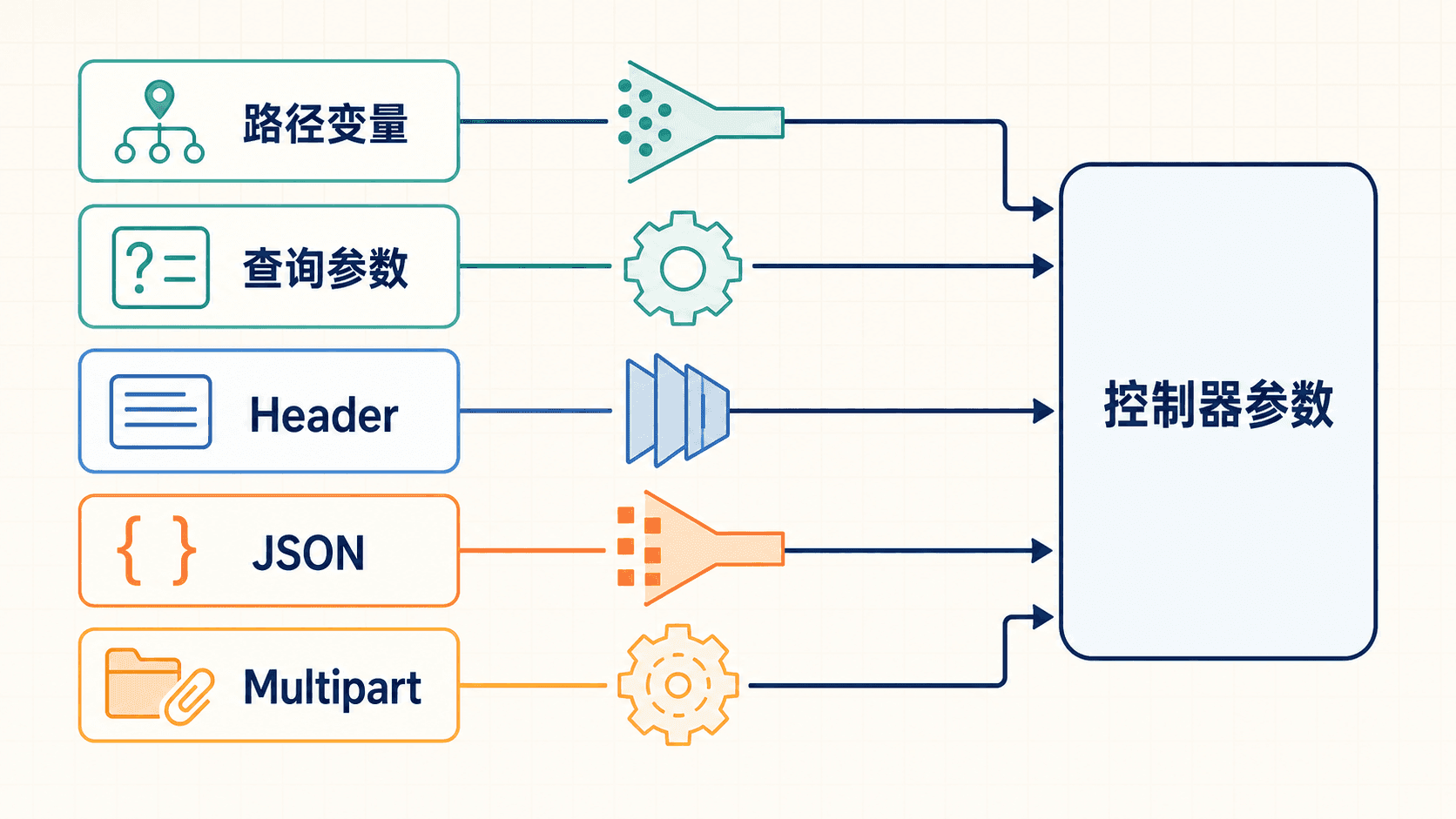
常见入口可以这样区分:
@RequestParam(defaultValue = "10") int size 里的默认值依然是字符串。MVC 之后通过 ConversionService 转成 int。TaskStatus 也会按枚举常量名转换,因此 status=TODO 成功,而 status=todo 默认不会自动忽略大小写。如果接口想接受中文或别名,应该注册明确的 Converter<String, TaskStatus>,不要在每个 Controller 里重复 if。
@RequestBody 走的不是同一套简单字符串转换。MVC 根据请求的 Content-Type 寻找能读取该媒体类型和目标 Java 类型的 HttpMessageConverter。项目中有 Jackson 后,JSON 转换器读取请求体并构建 CreateTaskRequest。随后 @Valid 才验证 DTO。
这也解释了两个看似相近的 400:
{"priority":"很高"}无法反序列化成整数,失败发生在消息读取阶段,控制器根本没有被调用。{"priority":9}可以成为整数,但违反@Max(5),失败发生在校验阶段。
调试时先确认失败在哪一步,比盯着控制器打断点更有效。
什么时候需要自定义参数解析
绝大多数接口用内置注解就够了。只有某种输入在很多 Controller 中反复出现,而且它有稳定解析规则时,才值得实现自定义 HandlerMethodArgumentResolver。比如每个任务端点都要从请求头解析工作空间上下文,可以定义 @CurrentWorkspace WorkspaceContext context,由一个解析器完成格式校验和对象构建。
自定义解析器的价值是把协议细节集中起来,但它不应偷偷访问数据库并执行重业务逻辑。参数解析发生在控制器方法之前,若里面包含慢查询,所有使用该参数的方法都会承担隐蔽成本,异常也更难理解。解析器适合把请求数据转成上下文,业务授权和资源查询仍交给后续层。
类型转换器也要保持单一职责。一个 Converter<String, TaskStatus> 可以定义大小写和别名规则,却不应根据登录用户动态决定某个状态是否可用。前者是文本到类型的确定转换,后者是业务权限。两者混在一起,会让相同字符串在不同请求里产生不同结果,调试非常困难。
请求参数与请求体也不要混用。Servlet 参数访问会触发表单数据解析,而 @RequestBody 需要读取原始请求体;对 application/x-www-form-urlencoded 表单应使用 @RequestParam 或 @ModelAttribute。想让一个方法同时猜表单和 JSON,表面上少写一个端点,实际会制造不稳定的读取顺序。
当参数很多时,可以把筛选项组成专用查询对象,通过 @ModelAttribute 绑定,再在对象内保存默认值和简单约束。但不要为了缩短方法签名把完全无关的请求头、分页和业务 DTO 塞进同一个“大参数对象”。边界清楚比形参数量少更重要。
不要自己解析 Accept 请求头
旧式示例常在控制器里读取 Accept,然后写一大段判断决定返回 HTML 还是 JSON。这样做绕过了 MVC 已有的内容协商机制,也很难正确处理媒体类型的权重、通配符和字符集。
TaskHub 直接用清楚的资源边界:
/tasks/**面向浏览器,返回 HTML。/api/tasks/**面向 API 客户端,返回 JSON。
即使路径分开,内容协商仍在工作。请求的 Accept 表示客户端能接收什么,方法的 produces 表示它能生成什么,返回值还必须有匹配的消息转换器:
java
@GetMapping(
        value = "/{id}",
        produces = MediaType.APPLICATION_JSON_VALUE)
public TaskResponse get(@PathVariable long id) {
    return taskService.get(id);
}
bash
curl -i \
  -H 'Accept: application/json' \
  http://localhost:8080/api/tasks/1
text
HTTP/1.1 200
Content-Type: application/json

{"id":1,"title":"补上接口测试","status":"TODO",...}
如果客户端只接受 application/xml,而项目没有可写 XML 的转换器和匹配方法,合理结果是 406 Not Acceptable。对于带请求体的 POST,Content-Type 说明客户端实际发送了什么;方法的 consumes 与消息转换器都不支持时,会得到 415 Unsupported Media Type。
Spring MVC 默认以 Accept 请求头为主要依据。不要把 .json、.xml 路径后缀当成默认协商方案;后缀会让路由、缓存和安全边界变得更难判断。确实需要另一种表示时,先确认它有真实消费者,再明确配置媒体类型。
Content-Type 与 Accept 回答的是两个问题
这两个请求头经常被混为一谈。Content-Type 描述“我这次发送的响应体或请求体是什么”,Accept 描述“我希望收到哪些表示”。POST JSON 常同时携带 Content-Type: application/json 和 Accept: application/json,但它们作用于相反方向。
consumes 参与请求映射,限制方法能读取的请求媒体类型;produces 也参与映射,限制方法能生成的响应媒体类型。选中方法后,消息转换器还要真正具备读写能力。仅仅在注解上写 produces = "application/xml" 不会凭空安装 XML 序列化器,最终依旧可能因为没有合适转换器而失败。
客户端表示可以接受任意媒体类型时,MVC 会结合可生成类型选择结果。浏览器通常发送一长串带权重的媒体类型,所以用 request.getHeader("Accept").contains("json") 这类字符串判断很容易出错。内容协商组件会解析媒体类型、通配符和质量因子,Controller 只需声明契约。
错误响应也参与协商。ProblemDetail 通常以 application/problem+json 返回,它比普通 application/json 更明确地告诉客户端“这是问题详情”。客户端仍应以 HTTP 状态码判断成功或失败,再按错误媒体类型解析结构,不能只检查响应体里有没有 error 字段。
内容协商不是“同一个接口必须支持越多格式越好”。每增加一种表示,都要维护字段语义、测试和缓存策略。TaskHub 当前 API 只承诺 JSON,页面只承诺 HTML,这个边界简单且足够。未来若真有 XML 消费者,再添加转换器和契约测试。
让错误也走统一响应
没有统一错误处理时,Controller 很快会充满重复代码:
java
try {
    return ResponseEntity.ok(taskService.get(id));
} catch (TaskNotFoundException exception) {
    return ResponseEntity.status(404).body(...);
}
每个端点都捕获一次不仅啰嗦,还会出现字段名、状态码和错误文案不一致。更好的方式是让 Service 抛出有业务含义的异常,Web 层集中把异常映射成 HTTP 响应。

java
package com.welearn.taskhub.web;

import com.welearn.taskhub.task.TaskController;
import com.welearn.taskhub.task.TaskNotFoundException;
import jakarta.servlet.http.HttpServletRequest;
import org.
@RestControllerAdvice 本质上是作用于多个控制器的 Advice,再加上响应体语义。启动时,MVC 会发现这个 Bean 和其中的 @ExceptionHandler 方法。请求失败后,异常解析器按异常类型寻找最合适的方法,返回的 ProblemDetail 再经消息转换器写成 application/problem+json。
这里把 Advice 限定在 API Controller 所在包,是为了不让浏览器页面意外收到一段 JSON。页面表单校验仍由 BindingResult 留在原页面;API 错误则使用稳定的机器可读格式。大型项目也常把 HTML 错误页和 API 错误响应拆成两个 Advice。
@Valid @RequestBody 校验失败通常产生 MethodArgumentNotValidException。如果约束直接写在方法参数上,例如 @RequestParam @Min(0) int page,新版本 MVC 的方法校验会产生 HandlerMethodValidationException。它们都属于 400,但错误来源不同;完整 API 应分别映射,而不是最后写一个 @ExceptionHandler(Exception.class) 把所有异常都伪装成“参数错误”。
返回效果如下:
json
{
  "type": "about:blank",
  "title": "任务不存在",
  "status": 404,
  "detail": "没有找到编号为 999 的任务",
  "instance": "/api/tasks/999",
  "requestId": "browser-8f31"
}
ProblemDetail 的 status 决定 HTTP 状态;instance 未显式设置时可以由当前请求路径补充。自定义的 requestId、fields 会作为扩展属性出现在 JSON 顶层。错误体给客户端解释“发生了什么”,完整堆栈仍应留在服务端日志,不能直接暴露类名、SQL 或文件路径。
异常处理不是把所有失败都吞掉
一个好的异常映射先区分“客户端可以改正”和“服务端需要处理”。任务不存在、字段校验失败、状态转换不允许,都可以给出稳定的 4xx 响应;数据库不可用、程序空指针或依赖服务超时属于服务端故障,通常应返回 5xx,并在日志和监控中留下足够上下文。
不要为图省事捕获 Exception 后一律返回 200 和一段“操作失败”。这样会让浏览器、网关和监控都把失败当成功,客户端也无法区分重试、修改参数还是停止操作。HTTP 状态码是协议的一部分,不是装饰。错误体负责补充细节,不能反过来掩盖状态码。
Advice 的匹配也有优先级。控制器类中的本地 @ExceptionHandler 通常先处理自己的异常,全局 Advice 再提供跨控制器规则;多个 Advice 同时存在时还要考虑顺序和作用范围。项目越大,越应该让每个 Advice 负责明确边界,例如 API 问题详情、页面错误视图和安全异常分别处理,而不是做一个无所不包的“全局兜底类”。
校验错误中的字段名是 API 契约的一部分。fields.title 让客户端把提示放到标题输入框附近;对象级约束可能没有单一字段,应放进单独的全局错误集合。重复字段错误用 putIfAbsent 保留第一条只是一个展示策略,如果前端需要全部规则,就应返回数组并固定顺序。
requestId 让客户端错误与服务端日志能够对账,但不要允许任意长、带换行的外部值直接进入日志。拦截器先检查字符集和长度,不合格就重新生成,这能避免日志注入和异常膨胀。关联 ID 不是认证凭证,不能用它判断请求者身份。
最后,不要把异常当作正常分支的唯一表达。例如列表查不到数据,返回空列表通常比抛“任务不存在”更自然;查单个资源才适合 404。异常类型应反映契约,而不是为了复用一个 Handler 强行把所有空结果都变成异常。
请求 ID 应该放在 Filter 还是 Interceptor
现在给每次请求加一个关联 ID。它既进入响应头,也进入错误体和日志,这样用户报出一个 ID 时,我们可以串起同一次请求的记录。
HandlerInterceptor 适合这个教学场景,因为它位于 MVC 的处理者执行链中,能知道请求最终匹配了哪个 Handler。实现如下:
java
package com.welearn.taskhub.web;

import jakarta.servlet.http.HttpServletRequest;
import jakarta.servlet.http.HttpServletResponse;
import org.slf4j.MDC;
import org.springframework.stereotype.Component;
注册拦截器:
java
@Configuration
public class WebMvcConfig implements WebMvcConfigurer {

    private final RequestTraceInterceptor requestTraceInterceptor;

    public WebMvcConfig(RequestTraceInterceptor requestTraceInterceptor) {
        this.requestTraceInterceptor = requestTraceInterceptor;
    }

    @Override
    public void addInterceptors(InterceptorRegistry registry
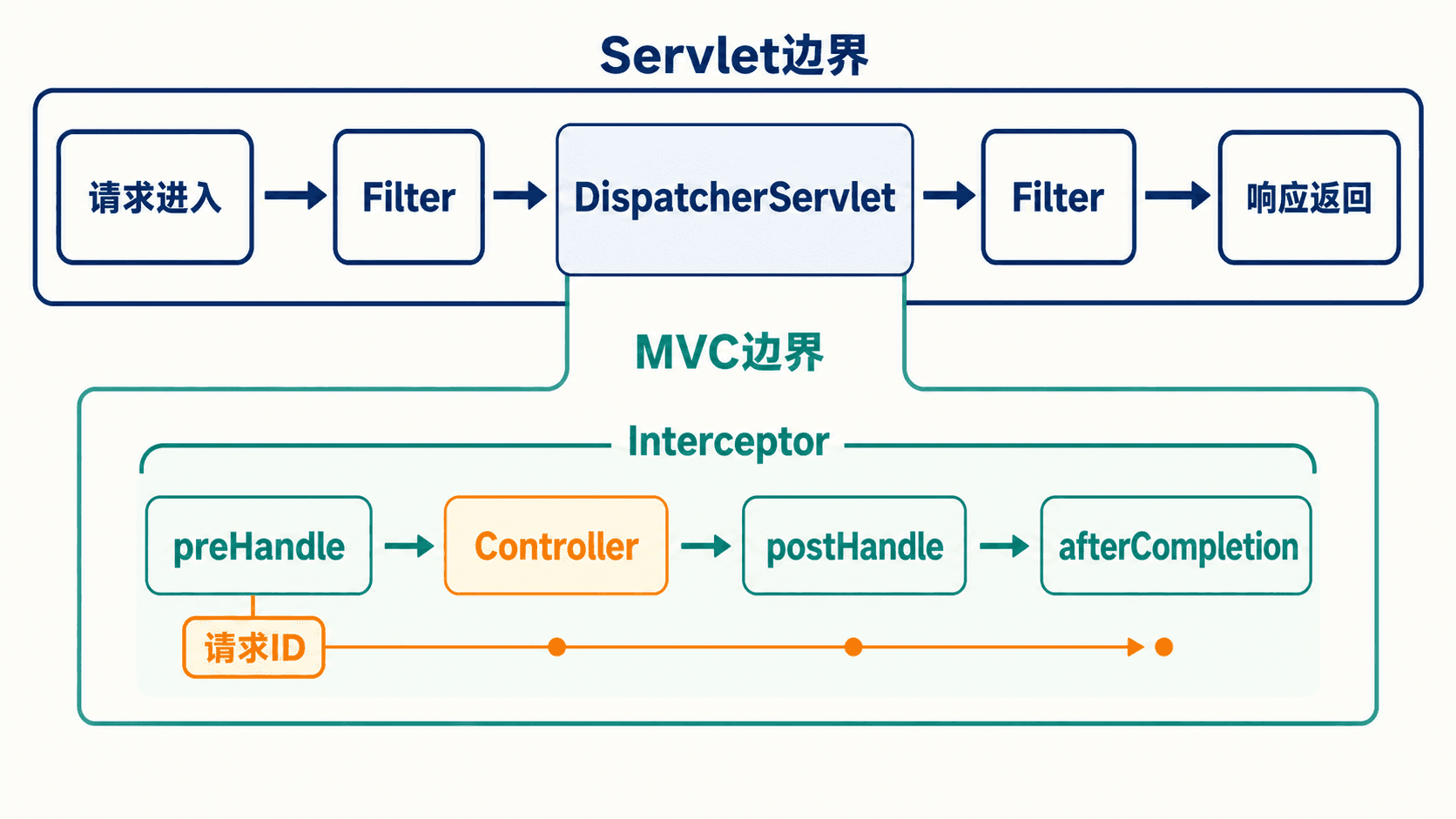
三个回调的时机要分清:
preHandle在控制器前运行,返回false会中断后续 Handler 调用。postHandle在 Handler 正常返回后运行,但对@ResponseBody和ResponseEntity来说,响应体可能已经在HandlerAdapter内写出,因此不要等到这里才添加关键响应头。afterCompletion在本次 MVC 请求结束后运行,适合计时、记录最终状态和清理 MDC。
为什么不把所有横切逻辑都放在 Interceptor?因为 Filter 位于 DispatcherServlet 外面,能覆盖静态资源、找不到 Handler 的请求、其他 Servlet 和更早期的异常。需要缓存或包装请求体、统一编码、处理转发头,或者让请求 ID 覆盖每一条进入应用的请求时,OncePerRequestFilter 往往更合适。
反过来,Interceptor 已经拿到 MVC Handler,可以判断它是不是某个 HandlerMethod、读取控制器注解,适合做处理者相关的计时和审计。权限校验不要靠自制 Interceptor:它的路径匹配可能与控制器映射出现偏差,认证授权应交给更早执行的 Spring Security Filter 链。
上面的 MDC 示例针对普通同步请求。若控制器开启 Servlet 异步处理,请求可能换线程或再次 dispatch,线程本地上下文需要显式传播,并应考虑 AsyncHandlerInterceptor 或观测组件。不要因为同步示例能打印 requestId,就假定异步回调也天然带着同一份 MDC。
执行顺序会影响你看到的结果
Filter 像套在 Servlet 外面的多层包装:请求按注册顺序进入 Filter,响应则按相反方向退出。Interceptor 也有类似规律,多个 preHandle 顺序执行,完成阶段通常逆序回收。添加第二个组件时,应显式考虑 order,而不是依赖“哪个类先被扫描到”。
如果安全 Filter 在请求进入 MVC 前就返回 401,Controller、MVC Interceptor 和 Advice 都可能没有机会执行。这是为什么把关联 ID 放在更外层 Filter 能覆盖安全失败,而放在 Interceptor 能更方便地关联 Handler 信息。真实项目可以让 Filter 建立 ID,再由 Interceptor 补充控制器方法名;两层共享同一个请求属性,避免各自生成不同 ID。
示例把响应头写在 preHandle,是因为这时响应尚未提交。若想统一修改 JSON 响应体,例如给所有成功响应包一层结构,postHandle 也不是稳妥位置;响应体可能已被消息转换器写出。此时应重新审视是否真的需要统一包装,必要时使用 ResponseBodyAdvice,并处理文件、流式响应和 ProblemDetail 等例外。
计时也要选择正确终点。只在 Controller 方法前后计时,看不到视图渲染和消息写出;afterCompletion 更接近完整 MVC 生命周期,但不一定包含客户端真正接收完网络数据的时间。日志中应把指标叫“服务端处理耗时”,不要误写成“用户页面加载时间”。
MDC 是线程本地数据,用完必须清理。Servlet 容器会复用工作线程,如果忘记 remove,下一次无关请求可能带着上一次的 requestId。finally 不是形式主义,它是在复用线程模型下避免上下文串线的必要动作。
文件上传其实是另一种参数解析
运营同事还希望给任务附上需求说明。文件上传不需要额外引入 Apache Commons FileUpload;Spring Boot 会使用 Servlet 容器的 multipart 支持,并配置 MVC 的 MultipartResolver。先设置明确上限:
yaml
spring:
  servlet:
    multipart:
      max-file-size: 5MB
max-request-size: 6MB有元数据和文件时,@RequestPart 比把所有内容都当字符串更清楚:
java
public record AttachmentMetadata(
        @Size(max = 200, message = "备注最多 200 个字符")
        String note) {
}
java
@PostMapping(
        value = "/{id}/attachments",
        consumes = MediaType.MULTIPART_FORM_DATA_VALUE,
        produces = MediaType.APPLICATION_JSON_VALUE)
public ResponseEntity<AttachmentResponse> uploadAttachment(
        @PathVariable long id,
        @Valid @RequestPart("metadata") AttachmentMetadata metadata,
        @RequestPart(
MultipartResolver 先识别并解析 multipart 请求。文件 part 被解析为 MultipartFile;带有 Content-Type: application/json 的 metadata part 则通过消息转换器变成 AttachmentMetadata。如果只上传一个文件,@RequestParam("file") MultipartFile file 也能工作;需要让某个 part 按自身 Content-Type 反序列化时,@RequestPart 更贴合语义。

调用示例:
bash
curl -i -X POST \
  -H 'Accept: application/json' \
  -F 'metadata={"note":"接口验收记录"};type=application/json' \
  -F 'file=@acceptance.pdf;type=application/pdf' \
  http://localhost:8080/api/tasks/1/attachments
text
HTTP/1.1 201
Content-Type: application/json
X-Request-Id: 1c369169-47fc-41cc-a649-707d5699b3f9

{"id":7,"taskId":1,"fileName":"acceptance.pdf","size":48213}
接收到 MultipartFile 只代表传输解析成功,不代表文件安全。存储服务至少要做到:
- 不把
getOriginalFilename()直接拼进本地路径,服务端生成随机存储名并阻止目录穿越。 - 不只相信客户端给出的 Content-Type;同时校验允许的扩展名、文件签名和实际用途。
- 同时限制单文件与整请求大小,对超限返回 413,而不是等内存或磁盘被占满。
- 文件放到对象存储或专用目录,不要写进随应用发布的 classpath。
- 高风险附件进入病毒扫描或隔离流程;数据库记录与文件写入失败时要设计补偿或清理。
这些检查属于附件业务和存储边界,Controller 只负责收取 part、选择状态码并调用服务。
Multipart 请求为什么更容易出问题
普通 JSON 请求只有一个整体 Content-Type;multipart 请求自身有一个 boundary,每个 part 又可以有自己的名称、文件名和 Content-Type。客户端少写一个边界、part 名称与 @RequestPart 不一致,或者 metadata 没声明为 JSON,都可能让请求在进入方法前失败。排查时应先看原始请求结构,不要先怀疑存储服务。
大小限制也发生在多个层次。反向代理可能先限制请求体,Servlet 容器或 Boot multipart 配置再限制,业务服务还可能按文件类型设更小上限。用户得到 413 时,要确认是哪一层拒绝,才能返回一致提示。把控制器里的 file.getSize() 当作唯一保护太晚了,因为整个请求可能已经被接收并写入临时存储。
文件名只适合作为展示元数据。不同用户可以上传同名文件,Unicode 字符和路径分隔符也可能被不同系统解释。服务端生成不可预测的对象键,把原始文件名经过长度和控制字符清理后单独保存,下载时再通过安全的 Content-Disposition 返回。
存文件和写数据库并不天然处在同一事务。数据库事务回滚不了已经上传到对象存储的字节,对象存储失败也不会自动撤销数据库提交。小系统可以先存临时对象,数据库成功后确认;失败时删除临时对象。更复杂的系统可以记录待处理状态并由补偿任务清理。无论选哪种,都要明确“中途失败后剩下什么”。
下载端点同样需要权限检查。知道附件 ID 不等于有权读取所属任务,Content-Type 和下载文件名也应由服务端控制。上传完成只是附件生命周期的起点,不要让公开静态目录绕过业务授权。
用现象倒推请求停在哪一层
Spring MVC 报错很多,但并不神秘。先观察状态码、日志和是否进入控制器,再沿请求链定位:
开发阶段可以临时把 org.springframework.web 日志调到 DEBUG,观察“哪个 HandlerMethod 被映射”“选择了哪种媒体类型”。项目启用 Actuator 后,/actuator/mappings 也能查看已注册的映射,但不要在生产环境匿名暴露这些内部信息。
只调用 Java 方法的单元测试无法覆盖请求映射、参数绑定、消息转换和 Advice。MVC 层应再写 MockMvc 测试,因为它会让请求真正穿过 DispatcherServlet,只是不用启动网络服务器:
java
import org.springframework.boot.webmvc.test.autoconfigure.WebMvcTest;
import org.springframework.test.context.bean.override.mockito.MockitoBean;

@WebMvcTest(TaskController.class)
@Import({
        ApiExceptionHandler.class
这个测试固定了一个很有价值的事实:非法枚举值在参数解析阶段就被拒绝,Service 不应该被调用。以后自定义 Converter、修改异常 Advice 或调整拦截器时,这条边界不会悄悄改变。
调试时按证据缩小范围
遇到请求失败,可以先做三个只读检查。第一,查看响应状态、Content-Type 和 requestId,确认拿到的是页面、API 问题详情还是容器默认错误。第二,查同一 requestId 的服务端日志,看请求是否进入 Filter、Interceptor 和具体 Handler。第三,查看已注册 mappings,确认你以为存在的方法确实被容器发现。
随后再决定把断点放在哪里。没有映射日志就查组件扫描和路径;映射成功但方法没进就查参数解析与校验;方法执行后失败就查 Service 和返回值处理。盲目在 Controller 第一行反复重试,只能证明断点没触发,不能说明请求去了哪里。
对 406 和 415,最有价值的证据是请求与响应头。复制 curl 命令时要保留 Accept、Content-Type 和 multipart part 类型。图形化客户端有时会自动补头或改请求体,再现问题时应导出为可读命令,减少“看起来一样”的隐含差异。
MockMvc 适合固定 MVC 契约,但它不启动真实 Servlet 容器。容器级上传限制、错误页 dispatch、网络压缩和代理头等行为还需要少量启动服务器的集成测试。测试分层和代码分层一样:用最快的层覆盖大多数规则,再把必须依赖真实环境的少数边界留给较重测试。
当一个测试断言 400 时,不要只断言状态。继续检查 application/problem+json、错误 title、字段集合和 X-Request-Id,才能防止框架升级后返回另一种 400 而测试仍然“绿”。契约测试的目的不是证明请求失败过,而是固定失败时客户端能依赖的形状。
把这些证据串起来以后,排错会从“Spring 为什么又没反应”变成一个可以逐层验证的问题:请求有没有进入容器,过滤器是否放行,映射是否命中,参数是否解析,业务是否执行,返回值是否被正确写出。每一步都有观察点,也都有对应的最小测试。
从一次性页面走向持续事件
现在 TaskHub 有两种稳定入口:API 客户端通过 /api/tasks/** 得到 JSON,运营同事通过 /tasks/** 使用 HTML 看板。它们经过同一个 DispatcherServlet,复用同一个 TaskService,区别只在 Web 层的输入与输出适配。Controller 没有复制查询,模板也没有承担业务规则。
Spring MVC 的同步模型与当前 JPA 持久层很匹配:一个请求进入,由一个容器线程执行查询和渲染,响应结束后连接完成。即便需要少量异步任务,Servlet MVC 也提供异步请求能力,所以“出现并发”不等于必须重写成 WebFlux。
真正值得重新评估的是另一类需求:页面要长时间保持连接,持续收到任务状态变化;一个请求需要并发等待多个慢速上游;系统希望用较少线程承载大量主要处于 I/O 等待的连接。此时执行模型本身才成了问题。
下一节会把“任务动态”放进独立的 WebFlux 应用,用 Flux 表达持续事件,用 SSE 让客户端逐条接收。我们还会保留这里建立的边界意识:注解外形可以相似,但 DispatcherHandler、事件循环、响应式信号和非阻塞数据源构成的是另一条链;把 JPA 调用包进 Mono 并不会让它自动变成非阻塞。